An AI chatbot for your website answers visitors from your own pages, at any hour, and passes the hard questions to a person. Installing a ready-made tool takes an afternoon; preparing your content and testing it takes about two working days. Making it answer correctly, and knowing when to pay for a custom build instead, is the part that decides whether it helps or annoys your customers.
This guide covers what a good website chatbot does, how to choose between a tool and a custom build, a 12-month cost comparison, and a launch checklist.
What a good website chatbot does
A useful chatbot does four things well, and a weak one fails at the last two:
- Answers from your content. It reads your help pages, pricing page, policies and product docs, and answers in plain words with a link to the page it used.
- Collects what you need. For a sales question it asks two or three things, such as company size or the product of interest. Then it sends them to your CRM or inbox.
- Says when it does not know. If the answer is not in your content, it says so instead of guessing. For example: "I don't have that information. Would you like me to pass your question to our team?"
- Hands over cleanly. A person gets the conversation with the visitor's question and contact details, during your working hours or by email outside them.
If your visitors mostly ask the same twenty questions, a chatbot can take a large share of them off your team. If every question is different and needs judgment, start with better help pages first.
Ready-made tool or custom build?
Most businesses should start with a ready-made tool. A custom build pays off when the bot must work inside your own systems:
| Your situation | Best fit | Why |
|---|---|---|
| Answers from public pages, a handful of questions repeat | Ready-made tool | Fast to set up, no developer needed |
| You already use a help desk such as Intercom or Zendesk | Your help desk's AI add-on | Conversations stay where your team works |
| The bot must read orders, accounts or bookings in your systems | Custom build | Tools rarely connect deeply to your own database |
| Strict data rules, or very high message volume | Custom build | You control the model, the data and the cost per message |
A custom build also makes sense when per-answer fees grow with your traffic. At high volume, paying the model provider directly is usually cheaper than paying a tool for each answer.
What the options cost over 12 months
The table compares three options for a site with about 1,000 chatbot conversations a month, 4 messages each (4,000 messages), of which about 600 end without a person stepping in. Every line is an assumption you can replace with your own numbers. All amounts are in US dollars, before tax.
| Cost item | Ready-made tool (Chatbase Standard) | Help desk add-on (Intercom Fin) | Custom FAQ chatbot |
|---|---|---|---|
| Setup | About 10 hours of your time | About 10 hours of your time | Assumed fixed quote of $2,000 (replace it with the quotes you receive), plus about 10 hours of your time to brief, prepare content and test |
| Plan or seats | $120 a month billed yearly (4,000 message credits) | 1 Essential seat, $19 a month billed yearly | None |
| Usage | Included up to the credit limit | $0.99 per Fin outcome × 600 = $594 a month | Claude Sonnet 5.5, about $36 a month (see below) |
| Hosting | Included | Included | Assumed on an existing server: $0 |
| Upkeep | 2 hours a month of your time updating content | 2 hours a month of your time | Assumed 2 hours a month from the developer at an assumed $50 an hour, plus your content updates |
| 12-month total | about $1,440 | about $7,360 | about $3,630 (about $3,220 with a smaller model) |
Totals do not include your own time: about 10 hours of setup and content preparation plus 24 hours of content updates over the year, for each option.
Tool prices are taken from the vendors' own pricing pages, chatbase.co/pricing and intercom.com/pricing, checked October 23, 2026. Intercom counts an outcome when the visitor confirms the issue is solved, stops asking after Fin answers, or Fin completes a workflow.
In this example the ready-made tool is the cheapest, as long as you stay under its message limit. 4,000 messages a month uses the whole Standard plan if each message costs one credit. Check in Chatbase how many credits your chosen model uses per message before you commit. More traffic means the next plan. Per-answer pricing grows fastest with volume. The custom build costs more than the tool in year one, but there is no per-answer fee to a vendor, only model usage of about a cent per message with Sonnet. Year two drops to usage and upkeep: about $1,630 with Sonnet and about $1,220 with Haiku. So with a small model, the custom bot is cheaper than the tool from year two. With more traffic the gap grows. At 15,000 messages a month, Chatbase Pro costs $4,800 a year. The custom bot's Sonnet usage would be about $135 a month, or about $2,820 a year with the same upkeep.
A custom chatbot has no standard price, which is why the $2,000 above is an assumption. Small, packaged builds give a floor. In its service templates, RemoteAI suggests specialists start at $250 for a website widget trained on up to 50 pages, $600 for up to 300 pages or files with hand-over to a human and an answer quality report, and $1,200 for a bot on your website and WhatsApp connected to your help desk, with two weeks of tuning (October 2026). A bot that reads orders or bookings in your own systems is a bigger scope and is quoted separately.
How the custom usage figure is calculated
Each message sends the model about 3,000 tokens (pieces of text) from your pages and the conversation, and gets about 300 back. At October 2026 prices on claude.com/pricing, 4,000 messages cost about $36 a month with Claude Sonnet 5.5 and about $1.80 with Claude Haiku 5.5. A small model is often enough for FAQ answers; test both on your own questions. If your company already pays for Claude Max ($100 to $200 a month of API credits) or Team (up to $500 a month pooled), those credits can cover a first chatbot (claude.com/pricing, checked October 23, 2026).
Who builds custom chatbots
A website chatbot that answers from your documents is a retrieval project, often called RAG (retrieval-augmented generation). The bot finds the right passage in your content, then writes the answer from it. On RemoteAI, about one profile in six lists RAG or retrieval, the core skill behind these bots, while few list a chatbot tool by name and chatbots appear in about 3% of live job posts:
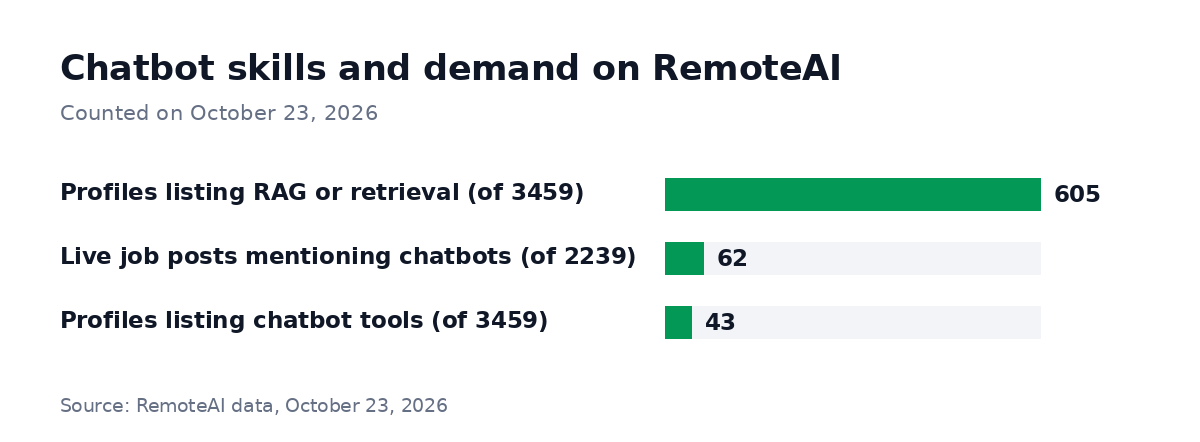
Method: counted on October 23, 2026. Profiles: the 3,459 public talent profiles on RemoteAI; a profile counts when one of its self-declared skills names RAG or retrieval, or a chatbot tool or framework (chatbot, conversational AI, Dialogflow, Rasa, Voiceflow, Botpress). Job posts: the 2,239 live job posts, whose title or description mentions chatbot, conversational AI or virtual assistant.
When you hire, ask to see a chatbot the developer built running on a real site, and ask what it answers when the question is not in the content. Our chatbot developers page lists chatbot specialists, and RAG engineers cover bots that must search large document sets.
Launch checklist
Before the chatbot meets real visitors, go through these six steps:
- Feed it only your own content. Help pages, policies, pricing, product docs. Remove outdated pages first, because the bot will repeat them.
- Write the refusal rule. Tell it to say it does not know and offer a hand-off when the answer is missing. Never let it invent prices, delivery dates or legal terms.
- Test on 50 real questions. Take them from your inbox or past chats, including the awkward ones, and check every answer against your pages.
- Set the hand-off. Decide who receives escalated chats, during which hours, and what the visitor sees outside them.
- Keep personal data out. Do not let the bot ask for card numbers or passwords, and check what the tool or model provider does with conversation data.
- Review weekly for a month. Read a sample of conversations, fix the content that caused wrong answers, and track how many chats needed a person.
How to start
Start with a ready-made tool on your top twenty questions and measure for a month how many conversations it resolves. Move to a custom build only if the tool's limits or fees get in the way. For support beyond the website chat, you can compare AI customer service experts who set up helpdesk automation.
If you need a custom build, post your chatbot project with your top questions, your tools and your budget range. Posting is free with an account (our team reviews jobs first when your company website is not verified yet), or $99 with no account. Ask each applicant to show a chatbot they have shipped. You can also browse chatbot developers directly.
Sources: Chatbase pricing and Intercom pricing, checked October 23, 2026. Claude API pricing, checked October 23, 2026 (Sonnet 5.5 $2/$10, Haiku 5.5 $0.10/$0.50 per million input/output tokens for prompts up to 100K tokens). RemoteAI service templates (suggested starting prices), October 2026. RemoteAI counts: method under the chart.