AI in HR means using language models and automation for the repetitive parts of people work. Think policy questions, job descriptions, interview scheduling, onboarding and HR data. That's where you save the most time. Hiring decisions need the most care, because tools that rank or filter candidates are listed as high-risk under the EU AI Act and regulated in New York City.
Adoption is moving fast. In SHRM's 2025 Talent Trends survey of 2,040 US HR professionals, AI adoption in HR tasks climbed to 43%, up from 26% in 2024. Below you'll find six uses, what a first project costs, and the rules to check before AI reviews a single application.
Six uses of AI in HR, from safest to most regulated
Here's where small and mid-size HR teams usually start, with the effort and the risk of each:
| Use | What it does | Buy or build | Risk |
|---|---|---|---|
| Policy assistant | Answers "how many days off do I have?" from your handbook, in Slack or Teams | Build on your documents, or use your HR tool's assistant | Low, if it cites the policy and hands over to HR |
| Job descriptions | Drafts a posting from a short brief and your past postings | Often built into your ATS | Low; a person edits and approves |
| Interview scheduling | Finds slots, sends invites, reschedules | Built into many ATS and calendar tools | Low |
| Onboarding workflow | Creates accounts, sends documents, reminds managers | Build with an automation tool | Low to medium (access rights) |
| HR data summaries | Explains attrition, time-to-hire or survey comments | Build on an export, or use your BI tool | Medium (personal data) |
| Application screening | Summarizes, ranks or filters candidates | Buy from a vendor or build | High: listed as high-risk under the EU AI Act, regulated in NYC |
In other words, start at the top of the table. The first four save hours every week and carry little legal risk. Screening can save a lot of time, but it needs an audit trail before it touches a real hire.
1. A policy assistant for employees
Most HR inboxes are full of the same questions: leave balances, expense rules, benefits dates. A policy assistant answers them from your own handbook and points to the exact section. When it isn't sure, it hands the question to a person.
What makes it work is the source. Give it the current handbook, one owner who updates it, and a rule that every answer cites the policy it comes from. For example, "Parental leave is 16 weeks (Handbook, section 4.2)" is checkable; "you probably have 16 weeks" is not.
2. Job descriptions from a short brief
A model can turn five lines into a full posting in your company's tone, for example "senior data engineer, remote EU, Airflow and dbt, owns the warehouse, reports to the CTO." Feed it two or three of your best past postings. Then keep a person on the final edit for pay, requirements and inclusive wording.
3. Interview scheduling
Scheduling is pure coordination, so it's an easy win. Many applicant tracking systems and calendar tools already include it; check yours before building anything.
4. Onboarding workflows
New-hire onboarding touches several tools: payroll, accounts, equipment, documents, a buddy, a 30-day check-in. An automation tool can run the checklist so you forget nothing, and AI can draft the welcome messages. Keep account creation and access rights behind an approval step.
5. HR data summaries
AI can explain an attrition export or 300 survey comments in plain language, such as "most exit comments in sales mention commission changes." Use pseudonymized exports where you can. Treat the output as a starting point for a conversation, not a finding.
6. Application screening, with care
This is often the most time-consuming part of hiring, and it's where the rules start. Here's what to know before AI ranks or filters candidates:
- EU AI Act. The European Commission's AI Act Service Desk lists "AI systems intended to be used for the recruitment or selection of natural persons" among high-risk uses (Annex III, point 4(a)). It notes that such systems "may perpetuate historical patterns of discrimination," and its worked example treats a job-matching and ranking tool as high-risk even when recruiters can review or override its rankings, because the rankings are a primary input to the decision. The obligations for these high-risk uses now apply from December 2, 2027, after the EU moved the original August 2026 date (Regulation (EU) 2026/1744). Check the details with counsel before you buy a screening tool.
- New York City, Local Law 144. An automated employment decision tool needs a bias audit within one year before use, with a public summary of the results. Candidates must get a notice 10 business days before use. The city began enforcing the law on July 5, 2023.
So what does that mean for you? Use AI to summarize applications for a recruiter rather than to reject anyone automatically. That lowers the risk of a bad automated rejection, but it doesn't take a screening tool out of these rules: the EU example above stays high-risk with a human reviewing, and NYC's law covers tools that substantially assist a hiring decision. Keep a record of how the tool is used, and ask any vendor for its bias audit and documentation. Check the rules where you hire with your counsel.
What a first project costs
A custom HR project has no standard price. The closest reference is a packaged service. These are the starting prices RemoteAI suggests to specialists in its service templates for the kind of builds HR teams start with (October 2026):
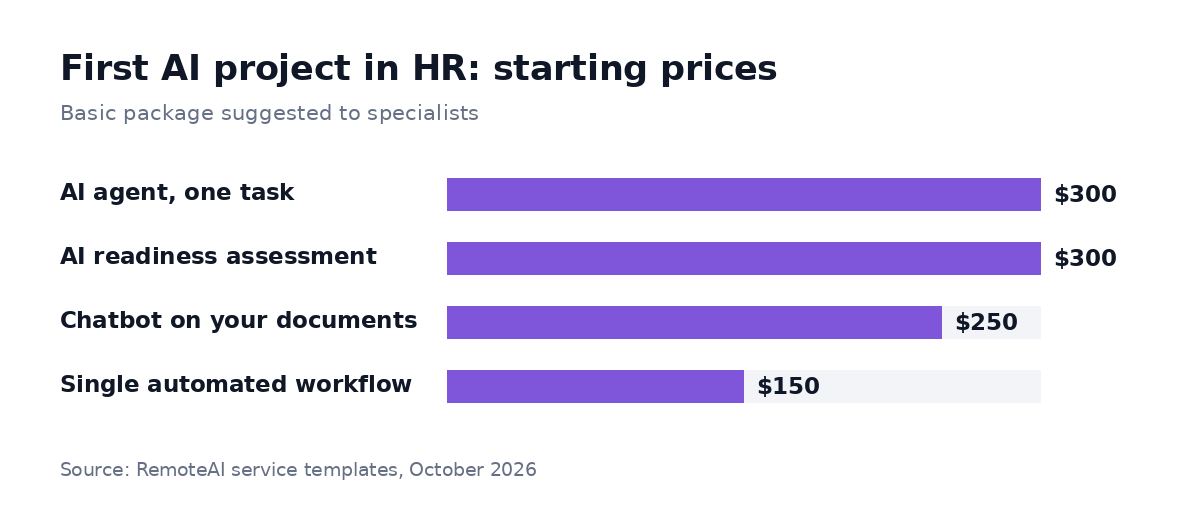
Basic-package starting prices RemoteAI suggests to specialists, October 2026. Bigger or custom scopes are quoted separately.
- Policy assistant: a packaged chatbot that answers from your own documents starts at $250 for up to 50 pages, $600 for up to 300 pages or files with a hand-over to a human, and $1,200 with a help desk connection. The template is written for customer questions, so it is the closest package to an internal policy assistant, not an exact match. You can find AI chatbot developers for it.
- Onboarding or scheduling workflow: a packaged workflow of up to 5 steps starts at $150, and up to 3 connected workflows with AI steps at $900. See the n8n, Zapier and Make experts.
- HR helpdesk agent that triages requests and acts in your tools: a packaged agent starts at $300 for one task and one tool, $750 with up to 3 tools and a human approval step, and $1,500 for a multi-step agent with up to 6 tools. See the AI agent developers.
- Not sure where to start: a packaged AI readiness assessment starts at $300 for 2 interviews and the top 5 opportunities, and $900 for up to 5 interviews and a 90-day roadmap with costs.
Anything bigger, such as a chatbot across several HR systems or an agent with many tools, is quoted separately. Ask for a fixed quote per milestone, with the deliverables in writing.
Running costs come on top. Here is a 12-month example for a policy assistant, with each assumption marked:
| Cost line | 12-month example |
|---|---|
| Setup | $600 (the standard chatbot package above) |
| Model usage | About $55 (assumption: 500 questions a month at about a cent each with a mid-size model) |
| Hosting | $0 (assumption: runs on a server or HR tool you already pay for) |
| Upkeep | 24 hours of HR time (assumption: 2 hours a month to keep the handbook and policies current) |
| 12-month total | about $655 plus 24 hours of HR time |
The usage line is calculated like our website chatbot guide: about 3,000 tokens sent and 300 received per question, at the Claude Sonnet prices listed on claude.com/pricing (checked November 8, 2026). With a small model it is under $5 a year. If your HR software sells an AI add-on instead, compare its yearly fee with this total.
How to start in four steps
- Pick one repetitive task that HR does every week and can check, such as answering leave questions.
- Collect 50 to 100 real examples with the answer you'd accept, so you can test before rollout. Our AI proof of concept guide shows how.
- Decide buy or build: check what your HR software already includes before you pay for a custom build.
- Set the limits: what the tool may answer, when it hands over to a person, and who owns the source documents.
You can post the project with that brief, or read our guide to AI strategy consulting if you want help choosing where to start across HR and the rest of the company.
The short version
AI in HR pays off fastest on policy questions, job descriptions, scheduling and onboarding: low-risk tasks that repeat every week. Screening candidates is where the rules begin: the EU lists recruitment and selection tools as high-risk, and New York City requires a bias audit and a notice to candidates. Start with one task, test it on real examples, and keep a person accountable for every decision about people.
Sources: SHRM, 2025 Talent Trends (43% vs 26%, 2,040 HR professionals, fielded February 2025); European Commission, AI Act Service Desk: high-risk AI systems guidelines (Annex III point 4(a)); NYC Department of Consumer and Worker Protection, Automated Employment Decision Tools (Local Law 144: bias audit, notice, enforcement from July 5, 2023), all read October 26, 2026. RemoteAI service templates (suggested starting prices), October 2026. Examples are illustrative.