Zapier automation tools connect the apps your team already uses so that work moves between them on its own. The core tool is the Zap: when something happens in one app, Zapier does something in another. Around it sit Tables, Forms, Chatbots, Agents, Copilot and MCP, each covering a different part of the job.
The tricky part is not building a Zap. It is knowing which tool fits the job and what the bill will look like once the workflow runs a few hundred times a month.
Here's what this guide covers:
- What each Zapier tool does, with one example for each
- How Zapier counts tasks, and a worked monthly cost for a common workflow
- Five workflows worth automating first
- The signs Zapier no longer fits, and what to do then
What Zapier automation tools do
Zapier automation tools take repeated, rule-based work off your team: copying data, sending notifications, creating records and routing requests. According to its homepage, Zapier connects to more than 9,000 apps, which is its main strength. If your CRM, inbox, help desk and spreadsheet are popular tools, Zapier almost certainly talks to all of them.
Each tool covers one part of an automated process. Here's how they split the work:
- Zaps. The workflow itself: a trigger ("a new form entry") followed by one or more actions ("create a contact", "send a Slack message"). Example: every new Typeform answer becomes a HubSpot contact and a message in #sales.
- Tables. A simple database inside Zapier for data that does not belong in another app yet. Example: a list of leads waiting for a callback, with a status column a Zap updates.
- Forms. Input pages that feed Tables and Zaps. Example: an internal request form for new laptops that creates a ticket and notifies IT.
- Chatbots. A chat window that answers from knowledge sources you add, such as help docs or web pages (the Free plan includes 2 chatbots). Example: a bot on your pricing page that answers plan questions from your help docs.
- Agents. AI that works through a task you describe in plain language, using your connected apps. Example: "each morning, check new support emails, tag the urgent ones and draft replies for review."
- Copilot. An assistant in the editor that drafts a Zap from a sentence. It saves setup time; you still check each step.
- MCP. A connection that lets AI assistants such as Claude or ChatGPT call Zapier actions. Example: asking your assistant to add a meeting summary to your CRM.
Behind the scenes, built-in steps do the plumbing. Filter stops a Zap when a condition is not met, Paths sends records down different branches, Formatter cleans dates and text, and Delay and Looping handle timing and lists. These matter for cost, as the next section shows.
How Zapier counts tasks (and why your bill depends on it)
Zapier bills by tasks, and a task is one action step that completes successfully. According to Zapier's pricing page, "a task is counted whenever Zapier successfully completes a unit of work for you," and the page lists what counts and what does not.
Counted as tasks:
- Each successful action step, including AI by Zapier and Code by Zapier steps
- Calls made through Zapier MCP (Zapier lists one MCP tool call at 2 tasks)
Not counted:
- Triggers and polling
- Filter, Formatter, Paths, Delay, Looping, Tables and Forms (Filter, Paths and Formatter need a paid plan)
- Failed actions
The same pricing page notes that AI steps can cost more than one task depending on the model, and Code steps that run past the plan's included time are billed one task per extra 30 seconds. Agents use a separate unit called activities: 400 a month on the Free plan and 1,500 on Professional.
In other words, the number of action steps per run decides your bill. A five-step Zap that runs 1,000 times costs five times more than a one-step Zap that runs 1,000 times.
A worked example: what a lead workflow costs
To estimate a Zapier bill, multiply the action steps per run by the runs per month. Here is a common lead-intake Zap for a small agency (a hypothetical example, priced with Zapier's October 2026 rates):
| Step | What it does | Tasks per run |
|---|---|---|
| Trigger | New website form entry | 0 |
| Filter | Skip entries without a company email | 0 |
| Action 1 | Create or update the contact in the CRM | 1 |
| Action 2 | AI by Zapier scores the lead from the message | 1 or more |
| Action 3 | Post the lead and score in Slack | 1 |
| Action 4 | Send a confirmation email | 1 |
That is at least 4 tasks per lead. At 300 leads a month, the workflow uses 1,200 tasks.
Here's how that lands on Zapier's plans:
- Free: 100 tasks, two-step Zaps only, and no Filter, Paths, Formatter or AI by Zapier, so this workflow does not fit.
- Professional, 750 tasks: $19.99 a month billed yearly ($29.99 monthly). Too small.
- Professional, 2,000 tasks: $49 a month billed yearly ($73.50 monthly). This is the plan you need.
- Team, 2,000 tasks: $69 a month billed yearly ($103.50 monthly), for shared workspaces and users.
Over 12 months, that is $588 on yearly billing or $882 paid month by month, for the Zapier plan alone. Add the build (your team's hours, or a specialist's quote), and an hour or two a month to check failed runs and update steps when an app changes. Those last two numbers depend on your team, so estimate them before you compare tools.
Two habits keep the number down. Put the Filter before the first action, so spam and test entries never use a task. And check whether two actions can become one, for example a CRM step that creates or updates in a single call.
Five workflows worth automating first
The best first Zaps are frequent, boring and easy to check. Each of these takes a recurring chore off someone's week, and a mistake is easy to spot.
- Lead intake. Form entry to CRM, Slack alert and a reply within minutes. Speed is the point: with an instant form trigger, the lead hears back while they are still on your site (polling triggers check every 2 minutes on Professional, 15 on Free).
- Invoice and receipt handling. Attachments from a shared inbox saved to a folder, logged in a spreadsheet and sent to your accounting tool.
- Support triage. New tickets tagged by topic, urgent ones posted to a channel, and an AI step drafting a first reply for a person to approve.
- Meeting follow-up. After a call, the notes go to the CRM record and a follow-up task is created for the owner.
- New client onboarding. A signed contract creates the project, the shared folder, the welcome email and the first invoice.
Keep a person in the loop for any step where AI makes a decision that reaches a customer. An AI step that drafts is safe to start with; an AI step that sends on its own needs weeks of checked results first.
What RemoteAI specialists build with
The tools automation specialists list on RemoteAI show where the work is moving. We counted approved RemoteAI profiles that mention each tool in their own description.
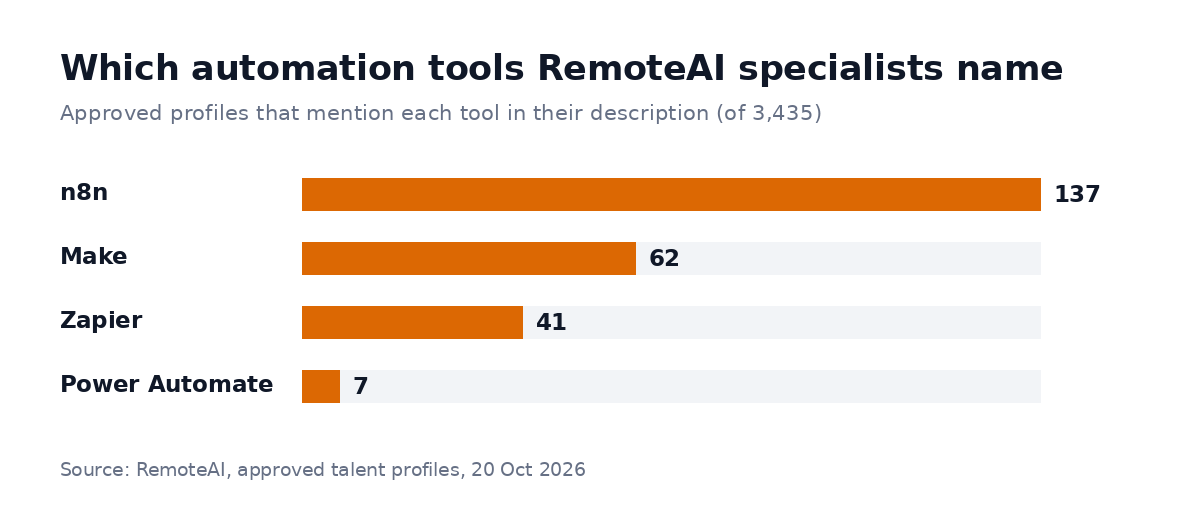 Approved RemoteAI talent profiles (3,435) that mention each tool in their description, counted on October 20, 2026. One profile can mention several tools; 167 mention at least one.
n8n comes first with 137 profiles, then Make with 62 and Zapier with 41. That does not mean Zapier is weaker. A likely reason: specialists sell the tools that take more skill to set up, while Zapier is built so a team can make its own Zaps.
For you, it means two things. If your workflows are simple, Zapier lets your own team do the work. If they grow complex, you will find more specialists who can move them to n8n or Make, or build them there from the start. Our guide to n8n workflow automation compares the three tools side by side.
Signs Zapier no longer fits
Zapier stops being the cheap option when a workflow has many steps, runs often or loops over long lists. Here are the signs to watch:
- The bill grows faster than the work. You move up a task tier every few months, but the team saves the same hours as before.
- Zaps turn into chains. One Zap triggers another, which triggers a third, and nobody can say which step failed last Tuesday.
- Loops over large lists. Processing 500 rows one action at a time multiplies tasks quickly.
- Data must stay in-house. Zapier runs in its cloud. If a client contract or regulation requires your own servers, self-hosted n8n is the usual answer.
- The logic needs real code. Code by Zapier helps, but long scripts hit time limits and become hard to maintain.
None of these means you should leave Zapier everywhere. Many teams keep simple Zaps in Zapier and move the two or three heavy workflows to another tool.
When to bring in a specialist
Build it yourself when the workflow has a few steps, touches no money and fails safely. Bring in a specialist when it connects several systems, uses AI to decide something, handles customer data or has to run without anyone watching it.
Before you hire, write down three things:
- The process today, step by step, with who does what
- The volume: runs per day or per month
- What a failure costs: a missed lead, a wrong invoice, an angry customer
For a reference point, RemoteAI suggests these starting prices to specialists who sell a packaged automation (October 2026): $150 for one workflow of up to 5 steps with 2 tool connections and an error alert, $400 for one workflow of up to 15 steps with an AI step and documentation, and $900 for up to 3 connected workflows with AI steps, data checks and 2 weeks of support. A build that connects several systems, handles customer data or needs custom code is quoted separately. Specialists set their own prices, so ask for a fixed quote per milestone, with the deliverables in writing.
You can browse AI automation and workflow specialists or see automation specialists who build integrations. If you also need AI beyond workflows, our guide on how to hire an AI engineer covers interviews and red flags, and the AI receptionist guide shows how phone calls can feed the same workflows. To see what other companies ask for, look at open automation jobs.
The short version
Zapier automation tools are the fastest way for a non-technical team to connect apps and remove repeated work. Start with one frequent workflow, count the action steps per run before you build, and put filters first so junk never uses a task. When workflows get long, loop over lists or must stay on your own servers, move those few to n8n or Make and keep the rest where they are.
Ready to automate the workflow that eats most of your team's week? Post your project, describe the process and your monthly volume, and compare specialists by the work in their profiles.
Sources: Zapier pricing (plans, task rules, Agents activities, checked October 20, 2026); Zapier (9,000+ apps, checked October 20, 2026); n8n pricing and Make pricing (billing units, October 2026). RemoteAI figures: approved talent profiles whose description mentions each tool, counted October 20, 2026; RemoteAI service templates (suggested starting prices), October 2026.