AI for small business works best as one small project that removes a chore your team repeats every week, not as a company-wide plan. Start with a task you can measure and check, then add the next one.
The good news is that a first project can be small: one workflow that moves data between two apps. The hard part is choosing it.
Here's what this guide covers:
- Four ways a small business can use AI, from no setup to a custom build
- Six first projects, with suggested starting prices and running costs
- How to pick yours in an afternoon
- The risks to check before you start
- What to put in the brief if you hire help
Four ways to use AI, from least to most setup
A small business can use AI at four levels. Each one takes more setup than the one before:
- A general AI assistant. ChatGPT, Claude or Gemini on a monthly plan, for drafting emails, quotes, posts and summaries, for example turning call notes into a follow-up email. No build; your team learns to use it.
- AI inside the tools you already pay for. Several helpdesks, CRMs and office suites include AI features. Turn them on and test them on real work, such as last week's tickets or deals, before buying anything new.
- Automations between your apps. Zapier, Make or n8n move data from one tool to another, with AI steps in between: a form entry becomes a scored lead in your CRM and a message to your team.
- A custom chatbot or agent. A specialist builds an assistant trained on your own content, for your website or your support inbox, for example one that answers "do you deliver to my area?" from your shipping page. Our guide to AI agents for business covers agents that act across your tools.
Levels 3 and 4 are where a weekly chore can disappear instead of getting a bit faster. Four of the six projects below sit there; the helpdesk project is level 2 set up by a specialist, and the assessment is for when you cannot pick.
Six first projects and what they cost
Here are six common first projects. Where a packaged version exists, the setup column shows the starting price RemoteAI suggests to specialists in its service templates (October 2026). These are starting points for a fixed, small scope; specialists set their own prices, and bigger or custom scopes are quoted separately.
| First project | What it removes | Suggested starting price (packaged) | Running cost |
|---|---|---|---|
| One automated workflow | Copying leads, orders or invoices between apps | $150 for up to 5 steps and 2 tools; $400 for up to 15 steps with an AI step | An automation plan, e.g. Zapier from $19.99 a month billed yearly |
| Website FAQ chatbot | Answering the same questions by email or chat | $250 for up to 50 pages and a website widget | Model or chatbot platform usage |
| AI on your helpdesk | Repeated support tickets | $1,200 for a chatbot connected to your help desk, with 2 weeks of tuning | Per-outcome or add-on fees, e.g. Fin at $0.99 per outcome, with a minimum of 50 outcomes a month on another helpdesk |
| Support or sales chatbot with actions | Order lookups, bookings, lead qualification | Quoted per project | Platform and model usage |
| Several connected workflows with AI steps | A whole process, such as lead intake to follow-up | $900 for up to 3 connected workflows with AI steps | Automation plan plus AI usage |
| AI readiness assessment | Not knowing where to start | $300 for 2 interviews and the top 5 opportunities | None |
Starting prices from RemoteAI's service templates, October 2026. You can compare specialists on the n8n, Zapier and Make experts, chatbot developers, AI customer service agents and AI implementation consultants pages. Zapier and Fin prices from their pricing pages, October 2026.
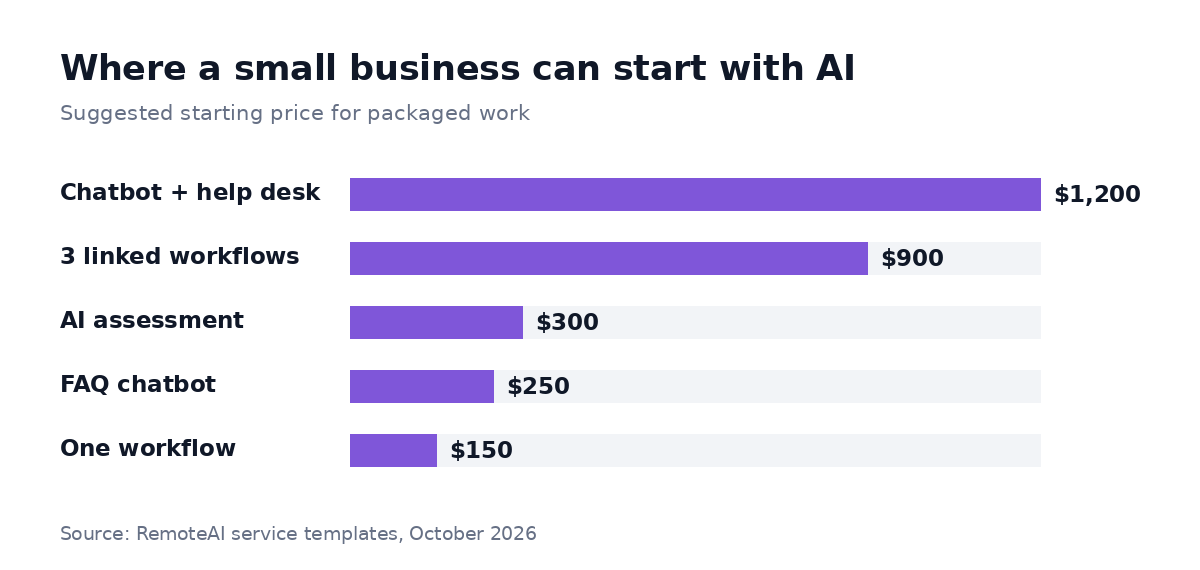 Suggested starting prices for five packaged first projects, from RemoteAI's service templates, October 2026. Custom scopes are quoted separately, and running costs are not included.
Phone calls are a seventh case: if your team loses time on calls and bookings, see our guide to an AI receptionist for small business.
How to pick your first project
The right first project is frequent, boring and easy to check. Here is a method you can run in an afternoon:
- List the chores your team repeats for one week. Write each one down with who does it, such as "Sam copies web leads into the CRM every morning".
- Add two numbers to each: hours a week, and what a mistake costs (a lost lead, a wrong invoice, an unhappy customer).
- Mark how easy it is to check. Can someone see in a minute whether the result is right?
- Pick the one with the most hours, a low cost of mistakes and an easy check. That is your first project.
Here is what that can look like for a small marketing agency (an example, not real data):
| Chore | Hours a week | Cost of a mistake | Easy to check? | Verdict |
|---|---|---|---|---|
| Copying form leads into the CRM and Slack | 3 | Low | Yes | First project: one workflow |
| Answering "what are your prices?" emails | 2 | Low | Yes | Second: FAQ chatbot |
| Writing monthly client reports | 4 | Medium | Partly | Later, with a person reviewing |
| Handling client complaints | 1 | High | No | Keep with a person |
The example shows why the biggest chore is not always the best first project. Client reports take the most time, but a wrong number in a report costs trust, so it waits until the team has experience checking AI output.
A worked first-year budget
Take the first project from the example: one workflow that sends each form lead to the CRM, scores it with an AI step and posts it in Slack. At 400 leads a month with 5 actions each, that is 2,000 Zapier tasks.
| Item | Assumption | First year |
|---|---|---|
| Build | One workflow with an AI step, at the $400 suggested starting price for that package | $400 |
| Zapier plan | Professional, 2,000 tasks, $49 a month billed yearly | $588 |
| AI step | Model usage for scoring each lead, billed by the AI provider (or counted as Zapier tasks with Zapier's built-in AI step) | Small at this volume; check your provider's pricing page |
| Data work | Cleaning CRM fields and mapping the form once | Part of the build, or a few hours of your team's time |
| Upkeep | About an hour a month to check failed runs | Your team's time |
| Total | Build and Zapier plan only, before AI usage and your team's time | about $988 |
Zapier price from its pricing page, October 2026. If a specialist quotes above the starting price, for example because your CRM fields need cleaning first, the build line grows. Our guide to n8n workflow automation compares Zapier, Make and n8n when volume grows.
Against that, the example agency gets back up to 3 hours a week if the workflow fully replaces the copying. After the hour a month of upkeep, that is roughly 140 hours a year (an assumption from the example, not a measured result). Whether that is worth it depends on what those hours are worth to you and what the team does with them.
The risks to check before you start
Three risks deserve a check before you start:
- Customer data in the wrong place. Before you paste customer details into an AI tool, check whether your plan uses your data for training, where it is stored and who can see it.
- Answers nobody checks. AI can be wrong with confidence. Keep a person on anything that reaches a customer until you have weeks of checked results.
- A tool nobody owns. Name one person who looks at the automation or chatbot every week. Without an owner, it breaks quietly when an app changes, for example when a form gets a new field.
When to hire help, and what to put in the brief
Do it yourself when the project is a short workflow between two popular apps, or turning on an AI feature you already pay for. Bring in a specialist when it connects several systems, answers customers, or handles payments or personal data.
On RemoteAI, specialists list this kind of work on their profiles: among 3,454 approved public profiles, 193 mention chatbots ("chatbot" or "chat bot") and 138 mention n8n in their own description (counted October 22, 2026; a mention is the talent's own words, not a skill test).
A good brief saves a round of calls. Write down:
- The chore today, step by step, and who does it
- The volume: how many times a day or a month
- The apps involved, and whether you have admin access to them
- What a mistake costs, and who checks the result
- Your budget range, using the table above as a reference
The short version
AI for small business pays off when you start with one weekly chore that is frequent, low-risk and easy to check. List your chores, pick one, budget the build and the running cost for a year, and name someone who owns it.
Ready to start? Post your first AI project with the chore, the volume and the apps involved, or browse automation specialists who build this kind of workflow.
Sources: RemoteAI service templates (suggested starting prices), October 2026; Zapier pricing and Fin pricing, October 2026. RemoteAI figures: approved public profiles whose description mentions "chatbot", "chat bot" or n8n, counted October 22, 2026.