An AI agent for business is worth it when it takes one real task off someone's desk, every day, without creating new work. Every software vendor now sells "AI agents", so you may wonder which ones actually do that.
This guide explains what an agent actually does, seven tasks worth handing over first, what it costs to build and to run, the risks to manage, and a simple way to start.
What an AI agent is — and is not
A chatbot answers questions. An agent does work. It receives an input, decides what to do following your rules, uses your tools and reports what it did:
- Input: a new email, a form entry, a document, a row in a spreadsheet, a ticket.
- Reasoning: a language model reads it and decides the next step, within limits you set.
- Action: the agent uses tools you connect — create a CRM record, book a meeting, update a sheet, draft a reply.
- Check: for anything sensitive, a person approves before the action happens.
The difference with classic automation (n8n, Make, Zapier) is the reasoning step: an agent can handle inputs that do not follow a fixed format — a messy email, a scanned invoice, a vague request. Many good systems combine both: automation moves the data, the agent reads and decides. Our guide to n8n workflow automation shows the automation side.
Chatbot, automation or agent: which do you need?
| You need… | Best fit | Example |
|---|---|---|
| Answers to questions, nothing changes in your systems | Chatbot | "What are your opening hours?" on your website |
| Data moved between tools in a fixed format | Automation (n8n, Make, Zapier) | Every form entry copied into the CRM |
| Messy inputs read, a decision made, then an action | AI agent | An email read, the request understood, a booking made |
If a simple rule can decide every case, plain automation is cheaper and more predictable, because nothing has to be interpreted. Bring in an agent only for the steps where a person currently has to read and think.
Seven business tasks worth handing to an agent
The best first tasks are frequent, follow rules a person could write down, and end with a clear action. Here are seven that fit:
- Inquiry triage. Read every incoming message, classify it, answer the simple ones from your own information and route the rest to the right person with a summary.
- Lead qualification. Check new leads against your criteria, enrich them with public company information, score them and book calls for the best ones.
- Document data extraction. Pull names, amounts, dates and terms from invoices, purchase orders or contracts into your systems — and flag what does not match.
- Meeting follow-up. Turn call notes into a summary, update the CRM, create the tasks and draft the follow-up email for approval.
- Customer support drafts. Prepare answers from your help center and past tickets; an agent reviews and sends with one click.
- Reporting. Collect the week's numbers from several tools, explain what changed and post the summary to your team.
- Phone calls. Voice agents answer calls, book appointments and pass urgent calls on — see our guide to the AI voice agent.
What an AI agent costs
There are two costs, and the first is usually the bigger one.
Building it. Mapping the task, writing the rules, connecting the tools and testing on real examples. As a guide, these are the starting points RemoteAI suggests to specialists for fixed-price agent projects:
| Scope | Typical content | Suggested starting price |
|---|---|---|
| Essential | 1 agent for 1 task, 1 tool connection, video hand-over | from about $300 |
| Standard | 1 agent with up to 3 tools, human approval step, testing on your real data | from about $750 |
| Premium | Multi-step agent with up to 6 tools, monitoring and error alerts, 2 weeks of support | from about $1,500 |
Running it. You pay the AI provider for the model's usage, measured in tokens (pieces of text read and written). The model you choose makes a large difference:
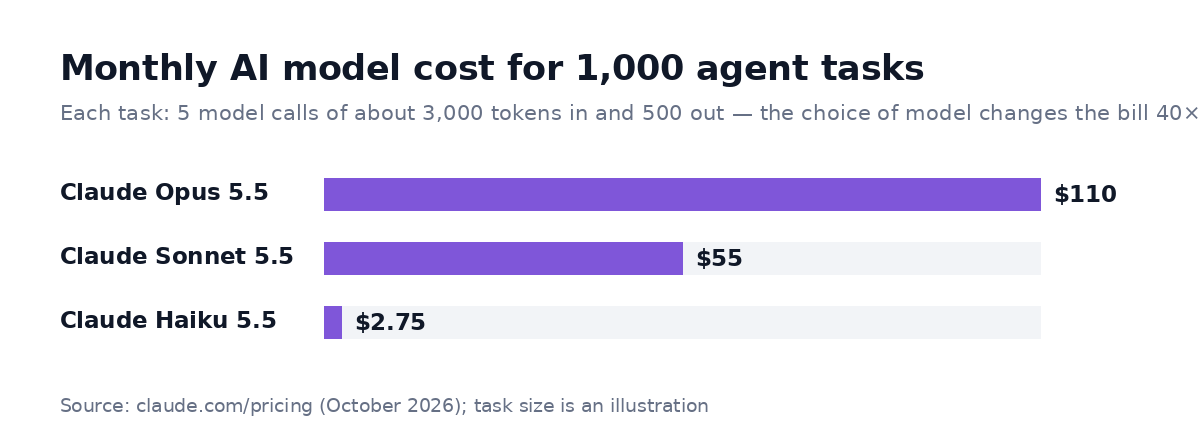
Illustration: each task makes 5 model calls of about 3,000 tokens in and 500 out. Prices from claude.com/pricing, October 2026.
That's why you should use a small, fast model for simple steps such as classifying or extracting, and keep a larger model for the steps that need careful reasoning. A well-designed agent often costs a few dollars a month to run.
The risks to manage
The risks of an agent come from what it can do without you, so manage these five:
- Wrong actions. Give the agent only the permissions it needs, and require approval for anything that sends money, reaches a customer or deletes data.
- Made-up answers. Limit the agent to your own information and instruct it to stop and ask when it is unsure. For example: "If the answer is not in the price list, reply that a colleague will confirm within a day."
- Silent failures. Log every action and send an alert when a step fails — an agent that stops quietly is worse than none.
- Data protection. Check what your AI provider does with the data you send, and keep personal data out of prompts unless your setup is designed for it.
- Drift. Your products, prices and policies change. Review the agent's instructions and a sample of its work every month.
How to know if the agent pays off
Before building, write down a simple calculation — it also tells you which task to automate first:
- Time saved: how many times a week the task happens × minutes per task.
- Value of that time: the hourly cost of the person who does it today.
- Cost of the agent: the build, spread over a year, plus the monthly model usage.
An illustration: an inquiry that takes 6 minutes to read, sort and answer, 300 times a month, is 30 hours of work. If the agent handles two thirds of them and a person approves the rest in a minute each, most of those hours come back — for a running cost of a few dollars to a few tens of dollars a month. If the numbers only work with perfect accuracy, pick another task.
After launch, track three numbers every week: tasks handled, tasks a person had to correct, and time spent on the approvals. If corrections stay high after a month, the rules or the examples need work, not a bigger model.
Who builds AI agents
Agent work sits between software engineering and operations, and the skill is still scarce. On RemoteAI, one AI job post in five asks for AI agent experience, while fewer than one reviewed AI profile in ten lists it:
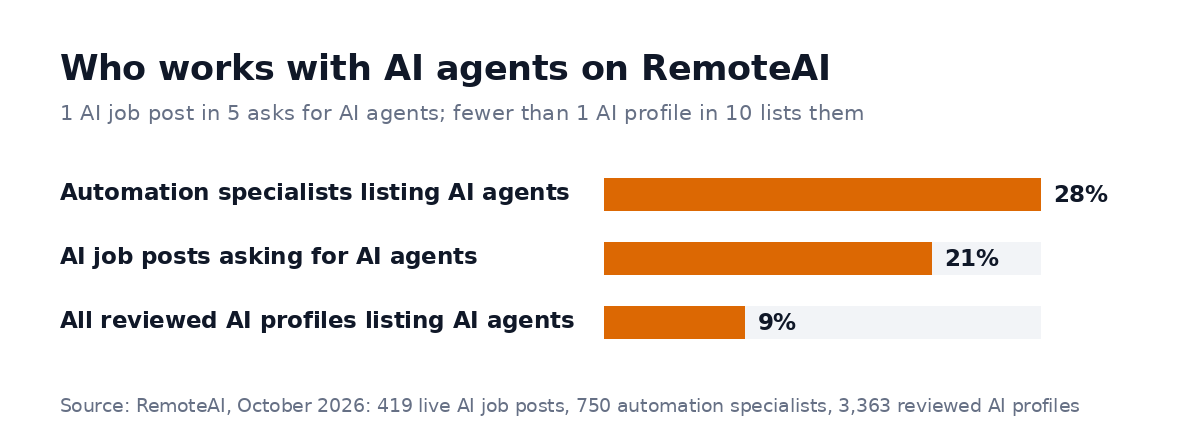
Automation specialists are the most likely to have built agents — most of them also write Python.
When you hire, ask to see an agent running on a real task. For instance, ask how it handles a confusing input, and what happens when a tool it depends on is down. Our guide on how to hire an AI engineer has the interview questions that work.
How to start in four steps
To start, take one task through these four steps:
- Pick one task that someone does many times a week and could explain in a page.
- Write the rules and collect 20 real examples, including the awkward ones.
- Build with a human approval step, and run it next to the person for two weeks.
- Measure the time saved and the error rate, then remove the approval where the agent is reliable — and move to the next task.
You can browse AI automation and agent specialists on RemoteAI, see all AI experts, or describe your project and get matched with people who have built similar agents.
Sources: Claude API pricing (October 2026). RemoteAI figures: live AI job posts, reviewed profiles and suggested service prices, October 2026.