n8n workflow automation turns the small jobs your team repeats every week into workflows that run on their own. Think of copying form entries into a CRM, forwarding invoices, chasing missing information or writing the same follow-up email. With AI steps, n8n can now also handle the parts that used to need a person to read and decide.
This guide explains what n8n is and what it costs. It then shows five workflows worth building first, how n8n compares with Zapier and Make, and when to have an expert build it for you.
What is n8n?
n8n is a workflow automation tool. You build workflows on a visual canvas. A trigger, such as a new form entry, an email, a schedule or a webhook, starts a chain of nodes that read, transform and send data between your tools.
Three things set it apart:
- It can be self-hosted. You can run n8n on your own server with Docker, which keeps data in your infrastructure. A cloud version is also available.
- Code where you need it. You can write JavaScript or Python at any step, which removes most of the limits of pure no-code tools.
- AI built in. n8n includes nodes for AI models and agents, so a workflow can classify, summarize, extract or write, and you can follow every step it took.
n8n says it offers over 500 integrations, and any tool with an API can be connected with a generic HTTP request.
What does n8n cost?
n8n's cloud plans are priced by workflow executions: one execution is one complete run of a workflow, however many steps it has. That is a big difference with tools that count every step.
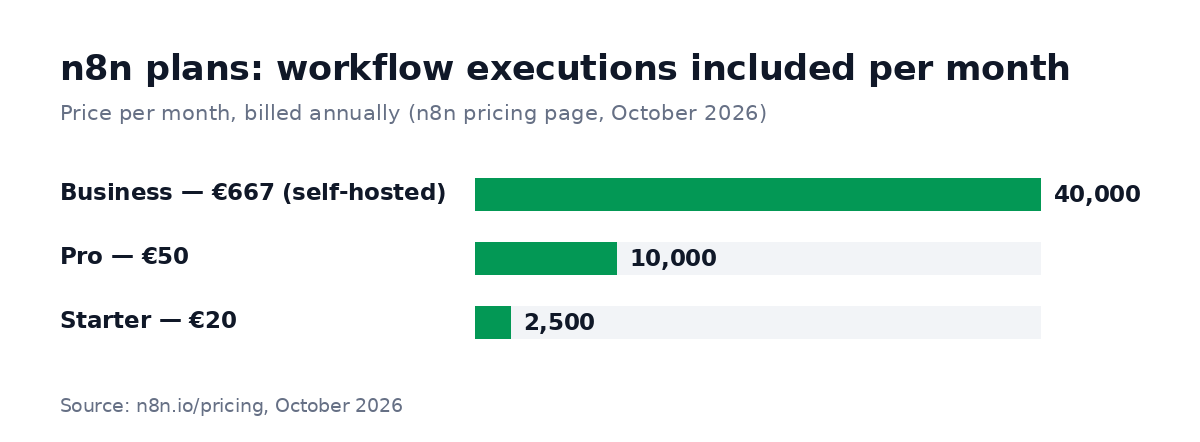
Prices per month, billed annually, from n8n's pricing page (October 2026). Starter and Pro have a free trial without a credit card.
If you self-host the Community Edition, you pay for the server instead, and for someone to keep it updated and backed up. The Community Edition is distributed under n8n's Sustainable Use License ("fair-code"). The source code is public and you can use it for your own business, but you can't resell n8n itself as a service.
Remember the other costs: AI model usage (charged by the model provider per request) and paid plans of the tools you connect.
Five n8n workflows with AI worth building first
The best first workflows are frequent, boring and rule-based, with one step where a person currently has to read something.
1. Lead capture and qualification
Lead capture is the easiest first workflow: every new inquiry is saved, scored and routed within a minute. When an inquiry arrives from your website form or email, the workflow saves it in your CRM and asks an AI model to summarize and rate it (high, medium, low). It then sends urgent leads to the right person on Slack or by email, and sends the contact a confirmation. Leads stop waiting in an inbox.
2. Invoice and document processing
To automate invoice processing, let the workflow read each PDF that arrives by email. It extracts supplier, amount, date and VAT, checks them against simple rules, adds them to your accounting tool or a sheet, and flags anything unusual for review instead of letting it through.
3. Support triage
Support triage sorts every new ticket before a person opens it. The workflow classifies the ticket by topic and urgency, tags it and routes it to the right team. For the most common questions, it adds a suggested answer that an agent can send in one click.
4. Reports that write themselves
Reports can write themselves once a week. For example, every Monday the workflow pulls numbers from your CRM, ads and analytics, builds a short summary with the changes that matter, and posts it to your team channel. No more copying numbers into slides.
5. Content and social publishing
Content and social publishing works well with a review step. When a new article or product goes live, the workflow drafts posts for each network in the right format, sends them for approval, then schedules them. A person stays in control, but the busywork disappears.
n8n vs Zapier vs Make
| n8n | Zapier | Make | |
|---|---|---|---|
| Best for | Technical teams, complex and AI workflows | Non-technical teams, quick connections | Visual, multi-step scenarios |
| Self-hosting | Yes | No | No |
| Custom code | JavaScript or Python at any step | Limited | Limited |
| Pricing unit | Workflow executions (one per run) | Tasks (each completed action) | Credits (consumed by each action) |
If your workflows are short and your team is not technical, Zapier is hard to beat for speed. If they have many steps, run often, need AI or must keep data in-house, n8n usually costs less and does more. The catch: it needs someone who is comfortable with data and APIs.
What makes a workflow reliable
A workflow that works in a demo is easy. One that runs every day for a year without silent failures needs a few more things:
- Error handling and alerts. When a tool is down or data is missing, the workflow should notify someone, not fail quietly. For example: "Invoice workflow stopped: supplier email had no PDF. 3 invoices waiting."
- Data checks. Validate fields such as emails, amounts and required values before writing to your CRM or accounting software.
- A human in the loop for AI. Let AI propose (a category, a summary, a draft) and keep a review step for anything that costs money or reaches a customer.
- Documentation. A diagram and a short video so your team understands what runs, and why.
- Cost control. Keep AI prompts short, avoid calling a model when a simple rule is enough, and watch execution counts.
Who builds n8n workflows?
The people who build serious automations are usually developers who also work with AI, not only no-code users. Among the reviewed automation and AI workflow specialists on RemoteAI, most combine Python with AI skills:
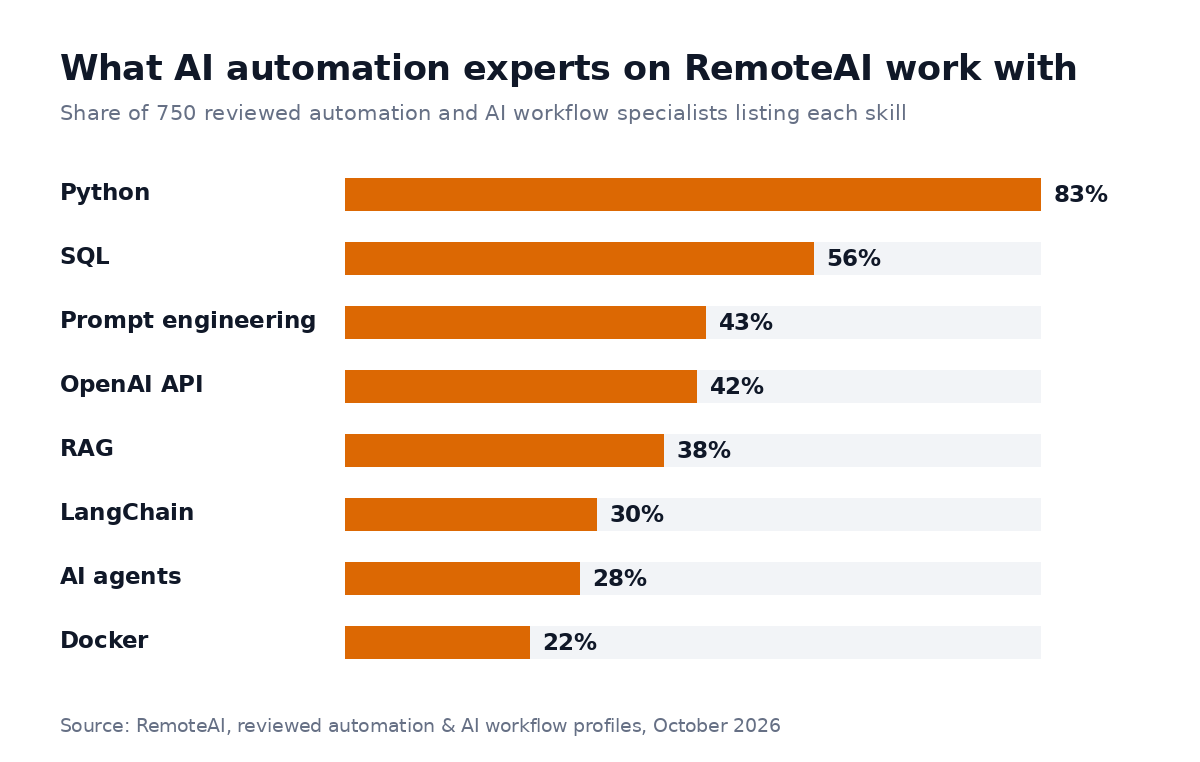
Most of the 750 reviewed automation specialists on RemoteAI write Python; four in ten work with the OpenAI API.
That matters when you hire: ask to see a workflow running for a real business, how they handle errors, and how they keep AI steps accurate.
Do it yourself or hire an expert?
Do it yourself if the workflow is simple (a few steps, two tools), mistakes are cheap and someone on your team enjoys learning the tool.
Hire an expert if the workflow touches customers, money or sensitive data, connects several systems, or uses AI to make decisions. When the scope is one workflow with clear inputs, delivery in days rather than weeks is possible; ask for the delivery date in the quote.
As a guide, these are the starting points RemoteAI suggests to automation specialists for fixed-price projects (RemoteAI pricing guidance, October 2026, not prices listed on a hire page; each specialist sets their own):
| Scope | Typical content | Suggested starting price |
|---|---|---|
| Essential | 1 workflow, up to 5 steps, 2 tool connections, error alert | from about $150 |
| Standard | 1 workflow, up to 15 steps, one AI step, documentation and video | from about $400 |
| Premium | Up to 3 connected workflows, AI steps and data checks, 2 weeks of support | from about $900 |
Specialists set their own prices, and the final price depends on your tools and the state of your data.
You can browse n8n, Zapier and Make experts, see all AI experts, or describe your project and get matched with people who have built similar workflows. Curious about voice automation too? Read our guide to the AI receptionist for small business, or learn how to hire an AI engineer for bigger projects.
The short version
In short, n8n is a strong choice when your workflows have many steps, need AI or must stay on your own servers. It is also priced per run rather than per step. Start with one frequent, boring process (lead intake, invoices or support triage), keep a person in the loop for AI decisions, and build in alerts from day one.
Sources: n8n pricing and n8n.io (October 2026); n8n on GitHub (license); Zapier pricing and Make pricing (October 2026). RemoteAI figures: the 750 profiles in the automation and AI workflows category, counted in October 2026 from public profiles that passed our review; skills and experience level are what each person lists on their profile. The suggested starting prices are RemoteAI guidance for specialists, not prices shown on a hire page.