n8n vs Zapier comes down to one difference that decides the bill. Zapier bills every action a workflow completes. n8n bills every run, however many steps it has. That rule decides which tool is cheaper for you.
The other difference is who builds. With Zapier, your marketing or operations person can set up a Zap alone. With n8n, you need someone at ease with data and APIs.
Here's what this guide covers:
- The short answer, in one table
- How each tool bills, with the same workflow priced at three volumes
- Who can build and maintain it in each tool
- Where Make fits
- What to put in the brief if you hire a specialist
The short answer
Pick Zapier when your team will build the workflows itself, the workflows are short and the volume is low. Pick n8n when workflows have many steps, run thousands of times a month, need code, or must run on your own servers.
| Zapier | n8n | |
|---|---|---|
| Billing unit | Task: each completed action | Execution: one full run of a workflow |
| Free option | Free plan, 100 tasks a month, two-step Zaps | Self-hosted Community Edition (you pay the server) |
| First paid plan | $19.99 a month billed yearly, 750 tasks | €20 a month billed yearly, 2,500 executions |
| Apps | More than 9,000, according to its homepage | Over 500 integrations, plus any API by HTTP request |
| Self-hosting | No | Yes |
| Who builds | Anyone on the team | Someone at ease with data and APIs |
Prices from the Zapier and n8n pricing pages, October 2026. n8n prices are in euros.
How Zapier and n8n bill
The two pricing pages measure different things, so the same workflow uses very different numbers of units.
Zapier counts tasks. According to Zapier's pricing page, "a task is counted whenever Zapier successfully completes a unit of work for you," so each successful action in a Zap is a separate task. Triggers, polling, Filter, Formatter and Paths are not, and failed actions are not counted. AI steps, code steps and some connectors can use more than one task, depending on the model and the connector.
n8n counts executions. n8n's pricing page says "an execution is a single run of your entire workflow". A workflow with 2 nodes and one with 20 nodes both use one execution per run. The catch: a workflow started by a Schedule Trigger runs, and counts, each time the schedule fires, even when there is nothing new to process.
In other words, with Zapier each extra step raises the bill, and with n8n each extra run does.
The same workflow at three volumes
To see what that means in money, take a common lead workflow. A form entry comes in and a Filter drops test entries. Then five actions follow: update the CRM contact, score the lead with AI, post it in Slack, send a confirmation email and log a row in a sheet.
That is at least 5 Zapier tasks per run (counting the AI step as one task, the minimum; a larger AI model can use more) and 1 n8n execution per run.
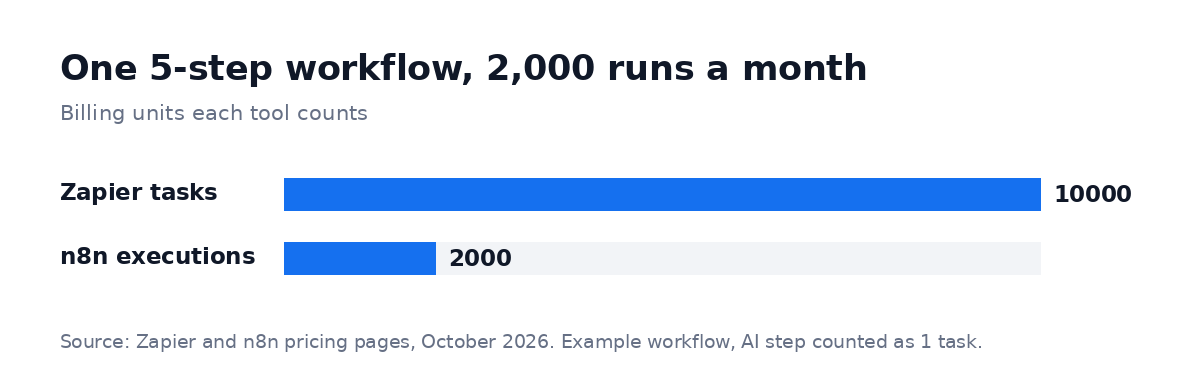 Billing units for the example workflow: 5 Zapier tasks per run vs 1 n8n execution per run. Plans and counting rules from the Zapier and n8n pricing pages, October 2026.
Here is how it lands on each plan, billed yearly:
| Leads a month | Zapier tasks | Zapier plan | n8n executions | n8n cloud plan |
|---|---|---|---|---|
| 150 | 750 | Professional 750: $19.99 a month | 150 | Starter: €20 a month |
| 400 | 2,000 | Professional 2,000: $49 a month | 400 | Starter: €20 a month |
| 2,000 | 10,000 | Professional 10,000: $129 a month | 2,000 | Starter: €20 a month |
Monthly billing costs more: $29.99, $73.50 and $193.50 on Zapier for the same tiers (October 2026). n8n's Starter plan includes 2,500 executions, with up to 5 executions running at the same time and no limit on active workflows; Pro is €50 a month billed yearly for 10,000 executions.
The 150-lead and 2,000-lead rows sit exactly on Zapier's tier limits. One test run or a busier month takes you past the limit. According to Zapier's pricing FAQ, your Zaps then keep running only with pay-per-task billing, charged at a higher rate per task, so pick the next tier if you are close.
At 150 leads a month, the two cost about the same, and Zapier's easier setup wins. At 2,000 leads, Zapier costs $1,548 a year on yearly billing and n8n Starter €240. The gap grows with each step you add to the workflow, because n8n's count stays the same.
Two things narrow the gap in real life. First, an n8n workflow started by a frequent Schedule Trigger uses executions even on empty runs. A check every 5 minutes is 8,640 runs a month before any lead arrives, so use a webhook trigger when the app supports one. Second, the plan is only part of the cost. The build, and the hour or two a month someone spends fixing failed runs, can cost more than the subscription in the first year.
A fuller first-year view at 2,000 leads a month: the plan is $1,548 on Zapier or €240 on n8n Starter (yearly billing). Add the build (a fixed quote from a specialist, or your own team's hours) and your team's time to test and fix runs. If you self-host n8n, swap the plan for a server and someone to maintain it.
Who can build and maintain it
The cheaper tool is not cheaper if nobody on your team can keep it running.
Zapier is built for the people who own the process. If you run sales, you can connect your form to your CRM in an afternoon. When a step fails, Zapier shows which one and why, in plain words.
The limit comes when Zaps grow long: chains of Zaps that trigger each other are hard to follow, and loops over long lists use tasks fast.
n8n is built for people who think in data. Workflows branch, loop, merge and call any API, and a Code node runs JavaScript or Python when the built-in nodes are not enough.
That power has a cost: someone has to understand expressions and JSON to fix a broken run. If you self-host, someone also has to update n8n, back it up and watch the server.
A simple test before you choose: who will fix this workflow at 9 a.m. on a Monday when it stops? If the answer is "the person who uses it", start with Zapier. If it is "our developer" or "a specialist we hire", n8n is a fair choice.
Where Make fits
Make sits between the two. Its visual editor handles branches, lists and data mapping better than a plain Zap, and it stays usable without code. It bills by credits: according to Make's pricing page, most actions use one credit, the free plan includes 1,000 credits a month, and some AI features use more.
That means Make's bill grows with actions per run, like Zapier's. One detail catches people out: a scenario that checks for new data every 15 minutes uses a credit on each check, which is 96 a day even when nothing arrives. Make's paid plans are sold by credit volume; check its pricing page for the current tiers before you compare.
What RemoteAI data shows
The specialists who build automations for clients lean toward n8n. We counted the approved profiles on RemoteAI that name each tool in their own description.
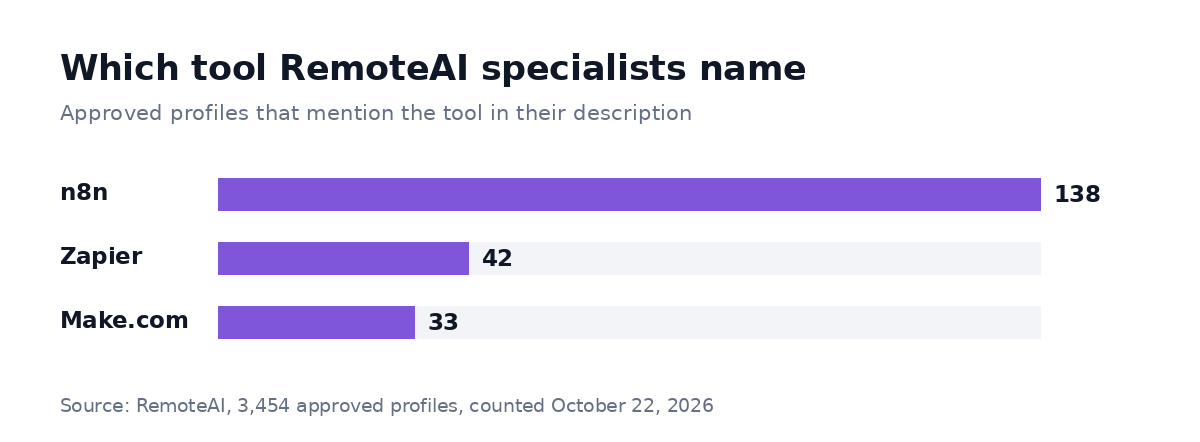 Approved RemoteAI talent profiles (3,454) that mention each tool in their description, counted on October 22, 2026. One profile can name several tools.
n8n comes first with 138 profiles, then Zapier with 42 and Make.com with 33. On the hiring side, 24 of the live job posts on RemoteAI mention n8n and 17 mention Zapier (live posts imported from employers' career pages or posted on RemoteAI, October 22, 2026).
A likely reason for the gap: specialists sell the tool that takes more skill to set up, while Zapier is designed so a team can make its own Zaps. For you, it means n8n specialists are easier to find on RemoteAI, and that a Zapier project can be one your team starts alone.
When to hire a specialist, and what it costs
Build it yourself when the workflow has a few steps, touches no money and fails safely. Bring in help when it connects several systems, uses AI to decide something, handles customer data, or when you are moving heavy Zaps to n8n to cut the bill.
For a reference point, RemoteAI suggests these starting prices to specialists who sell a packaged automation in n8n, Zapier or Make (October 2026): $150 for one workflow of up to 5 steps with 2 tool connections, $400 for one workflow of up to 15 steps with an AI step and documentation, and $900 for up to 3 connected workflows with AI steps, data checks and 2 weeks of support. Moving a set of heavy Zaps to n8n, or a company-wide system, is quoted separately. Specialists set their own prices, so ask for a fixed quote per milestone, with the deliverables in writing. You can compare n8n, Zapier and Make experts by the workflows in their profiles.
A good brief saves a round of questions. Write down:
- The process today, step by step, with who does what
- The volume: runs per day or per month, today and in a year
- The apps involved, and whether each one has a webhook or an API
- Where it must run: Zapier's cloud, n8n's cloud or your own server
- What a failure costs: a missed lead, a wrong invoice, a customer who waits
If you are moving from Zapier, add your task usage by Zap. The two or three Zaps that use the most tasks are where most of the saving can be, and the rest can stay where they are.
For a deeper look at n8n itself, with AI examples, see our guide to n8n workflow automation. If the workflow includes an AI agent that talks to customers, our guide to AI agents for business covers scope and risks.
The short version
Zapier bills each action, n8n bills each run. For short workflows at low volume that your own team will build, Zapier is the simpler choice and costs about the same. For long workflows that run thousands of times a month, n8n's plan costs a fraction of Zapier's (€240 vs $1,548 a year in our 2,000-lead example), as long as someone can maintain it.
Ready to build it? Post your automation project with the process, the volume and the apps involved, or browse automation specialists to see who has built something similar.
Sources: Zapier pricing (plans, tiers and task rules, October 2026); n8n pricing (plans, executions, concurrency, October 2026); Make pricing (credits and free plan, October 2026). RemoteAI service templates (suggested starting prices), October 2026. RemoteAI figures: approved public profiles and live job posts that mention each tool, counted October 22, 2026.