Every small business knows the moment: you are with a customer, the phone rings, and you let it go to voicemail. Some of those callers won't leave a message and will try the next business on the list instead. An AI receptionist answers that call instead, at any hour, and handles the routine part of the conversation so you only deal with the calls that need you.
This guide explains what an AI receptionist can realistically do, what it costs, and how to set one up so it helps your customers instead of frustrating them.
What an AI receptionist actually does
An AI receptionist is a voice agent connected to your phone number. It listens, understands what the caller wants, answers in a natural voice and takes action through the tools you already use. For a small business, the useful jobs are concrete:
- Answering the questions you hear every day: opening hours, prices, location, parking, what is included in a service.
- Booking, moving and cancelling appointments directly in your calendar, with confirmation texts.
- Taking messages properly (name, number, reason for the call) and sending you a clean summary instead of a voicemail.
- Qualifying new inquiries, asking the two or three questions you would ask yourself before quoting.
- Routing urgent calls to the right person, and only those.
- Working out of hours, on weekends and during your busiest moments, when no one can pick up.
What it should not do is improvise. The best set-ups are narrow and reliable: a clear list of what the agent handles, and a clean hand-over to a human for everything else.
Which small businesses get the most out of it
AI receptionists pay off fastest where calls are frequent, repetitive and tied to bookings:
- Clinics and dental practices: appointment requests, reminders, rescheduling.
- Salons, spas and fitness studios: bookings and cancellations at all hours.
- Home services (plumbing, HVAC, cleaning, electricians): capturing the job details and urgency while you are on site.
- Restaurants: reservations and the same five questions about hours and menus.
- Law firms, accountants and agencies: screening new inquiries before a consultation.
If most of your calls are complex, emotional or unique, an AI receptionist is better used as an out-of-hours assistant that takes structured messages, not as your main line.
What it costs
There are two ways to get an AI receptionist, and they cost very different amounts.
1. An off-the-shelf AI receptionist subscription. Several products sell a ready-made receptionist for a monthly fee, often with a limit on minutes or calls. They are quick to start, but you work within their templates: limited control over the script, the integrations and what happens when a call goes off-track.
2. A receptionist built on a voice AI platform. A specialist builds your agent on a platform such as Vapi or Retell AI, or on a similar stack. That stack combines a speech-to-text model, a language model, a text-to-speech voice and a phone number from a provider like Twilio. You pay:
- a one-time set-up to design the call flows, connect your calendar and CRM, and test it on real calls;
- usage costs for each minute of calls. On Retell AI's pricing page (October 2026), the default estimate is about $0.11 a minute, and about $0.15 with a larger language model and a phone number. Premium voices and models push it higher, and billing continues during silence and hold time. Vapi bills the same way: a platform fee per minute, plus the model, voice, transcription and phone line.
For most small businesses, the running cost is small compared with a missed booking. The set-up is where quality is decided.
What a fixed-price set-up usually includes
Specialists usually package this work as clear, fixed-price offers. According to the suggested starting prices RemoteAI gives its voice-agent specialists (October 2026), a typical structure looks like this:
| Package | What you get | Suggested starting price on RemoteAI |
|---|---|---|
| Essential | Answers common questions, takes messages, sends call summaries | from about $300 |
| Standard | Everything above, plus booking in your calendar and transferring urgent calls | from about $700 |
| Premium | Booking, reminders and follow-ups, CRM update after each call, two weeks of tuning | from about $1,400 |
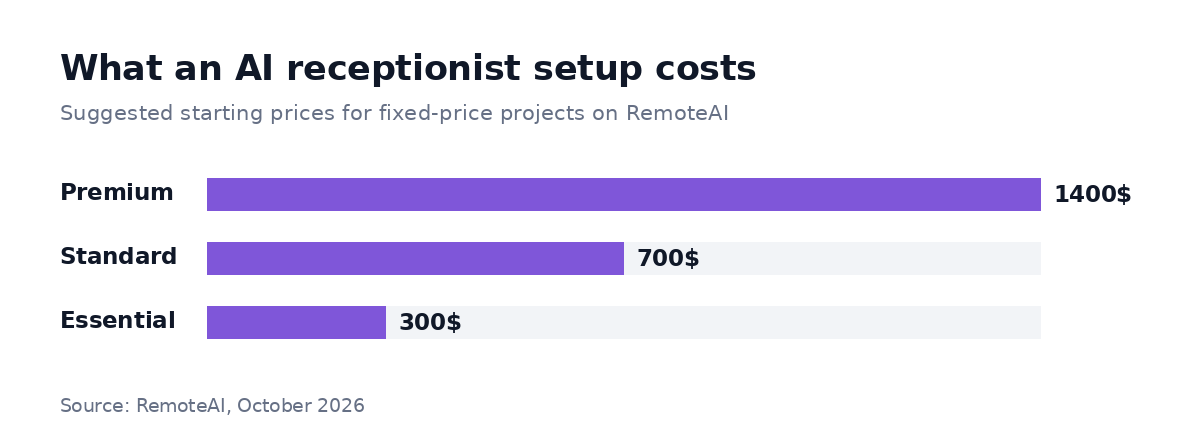
Suggested starting prices for fixed-price projects on RemoteAI, October 2026.
These are starting prices for packaged services with a fixed scope. A custom project usually costs more. On our page for AI voice agent developers, a typical AI receptionist project runs $800–$3,000. A phone agent with several call flows and integrations runs $3,000–$12,000. The difference comes from the number of call types, the integrations and how much testing is needed.
Here's a hypothetical budget, to show how the pieces add up. A clinic gets 400 calls a month that last 3 minutes on average, so 1,200 minutes. At about $0.15 a minute, usage costs about $180 a month. Add a Standard set-up from about $700, once. Over 12 months, that's about $700 + $2,160 of usage = about $2,860 before tax, plus your team's time to write the answers and read the call summaries.
How to set one up without losing customers
To set one up without losing customers, follow these six steps. A receptionist that annoys callers is worse than voicemail, so each step protects the caller first.
1. List your top ten call reasons
Go through a week of calls (or ask whoever answers the phone) and write down why people call. In many small businesses, three or four reasons cover a large share of calls, such as "book or move an appointment", "opening hours" and "is my order ready?". Start with those only.
2. Write the answers you want it to give
Write down the answers you want it to give: prices, hours, policies, what to say when you are fully booked. The agent can only be as good as that information. Keep it short and accurate: this is the part most set-ups rush.
3. Decide the hand-over rules
Hand-over rules decide when a human takes over. Common rules: the caller asks for a person, the request is urgent, the caller is an existing client with a complaint, or the agent is not confident. Decide whether that means a live transfer or a message with a callback promise, and keep the promise.
For example, a good hand-over sounds like: "I'll put you through to the team now, and I've sent them a note with your question so you don't have to repeat it."
4. Connect the tools you already use
Connect the tools you already use, so bookings land in your real calendar and messages arrive where you look: email, SMS, Slack or your CRM. A receptionist that writes notes nobody reads does not help.
5. Test on real calls before going live
Call it yourself with the awkward questions: accents, background noise, people who change their mind, people who only want a human. Then run it out of hours first, read the call summaries for a week, and adjust.
6. Keep improving with the call summaries
Keep improving with the call summaries, because the first weeks show exactly where the agent hesitates. A good specialist includes a tuning period to fix those gaps. That is the difference between a demo and something your customers like.
Doing it yourself or hiring a specialist
Doing it yourself works if you are comfortable with tools and only need an out-of-hours message-taker: a subscription product may be enough. Hire a specialist as soon as you want bookings in your calendar, CRM updates, several call types and reliable hand-overs. Someone who has built these before can spend less time on trial and error, and your callers don't test a half-finished setup.
When you hire, ask for three things: a short demo call on a scenario from your business, the list of what the agent will and will not handle, and how hand-overs work. Specialists who have built these before answer all three in minutes.
To get comparable quotes, send every specialist the same short brief. You can copy this one and fill in the brackets:
Project: AI receptionist for [business type] in [city or time zone]. Calls: about [number] calls a month; top reasons: [reason 1], [reason 2], [reason 3]. It should: answer those questions, book in [calendar tool], take messages, transfer urgent calls to [person or number]. Hand over to a person when: [rules, e.g. complaint, urgent request, caller asks for a human]. Tools to connect: [calendar, CRM, email or SMS]. Budget and date: [range], live by [date].
You can browse AI voice agent developers on RemoteAI, see other AI experts by skill, or post your project and let specialists come to you. If your project also involves chatbots or automation, our other guides cover those too.
What to measure in the first month
In the first month, measure four numbers. Decide on them before you switch it on for every call:
- Missed calls: how many calls went unanswered before, and how many now.
- Bookings made by the receptionist: appointments or callbacks it created on its own.
- Transfers and complaints: calls it had to pass to a person, and any caller who was unhappy.
- Time saved: minutes your team no longer spends on the phone each day.
Review a sample of call summaries every week. If the same question keeps reaching a person, add the answer to the receptionist's knowledge.
The short version
In short, an AI receptionist will not replace the warmth of a great front desk. It can pick up the calls your team misses, handle routine requests at any hour, and give you clean notes on every inquiry. That works when it is set up and tested with care. Start narrow, write good answers, set clear hand-over rules, test on real calls, and grow it from there. When you're ready, compare AI voice agent developers or post your project.
Sources: Retell AI pricing and Vapi billing documentation, checked October 13, 2026. RemoteAI suggested starting prices and project ranges, October 2026.