AI for ecommerce pays back fastest on work that repeats every day and is easy to check: answering order-status and return questions, writing and cleaning up product content, and helping shoppers find products. Start with what your platform already includes, add one app for your biggest repeated task, and pay for a custom build only when nothing on the market fits.
What to know:
- Support is the best first use for most stores: the questions repeat and you can check the answers.
- Check your platform first. Shopify, for example, says many AI features in its admin come at no additional cost, depending on plan, device and language (Shopify Help Center, checked October 29, 2026).
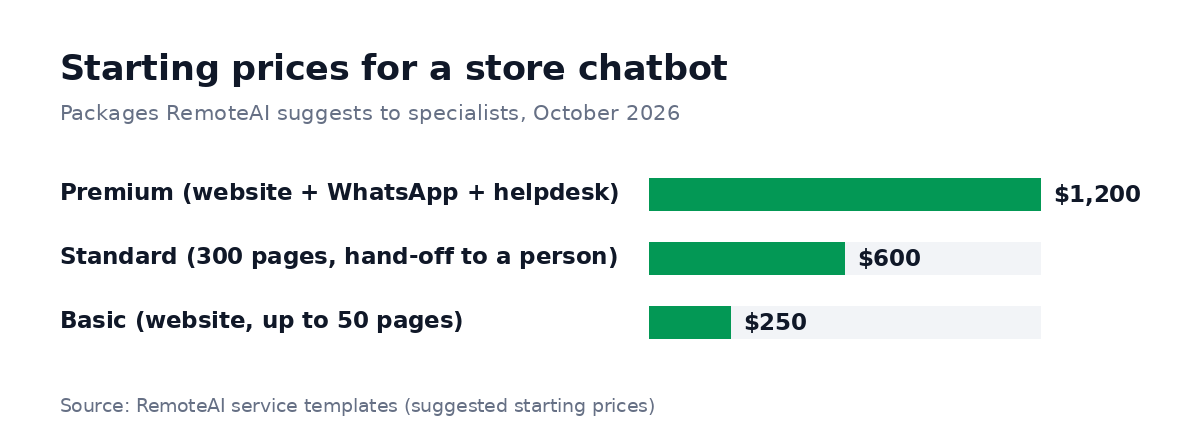
- When you need an expert, start with a packaged scope: RemoteAI suggests starting prices of $250 to $1,200 to specialists for a store chatbot (October 2026).
The seven uses, ranked by payback
The ranking below is our own judgment, not survey data, for a small or mid-size store, from a few hundred to tens of thousands of orders a month. It weighs how often the task repeats, how easy the result is to check, and how much setup it needs. Here's the order:
| Rank | Use | What it does | Easiest way to start | Number to watch |
|---|---|---|---|---|
| 1 | Order and policy questions | Answers "where is my order?", shipping and returns | AI feature of your helpdesk | Share of tickets closed without an agent |
| 2 | Product content | Writes and cleans up descriptions, titles, tags | Your platform's built-in AI | Hours spent per new product |
| 3 | Search and recommendations | Understands what shoppers type, suggests related items | A search or recommendation app | Searches with no result |
| 4 | Email and SMS | Writes variants, picks send times and segments | Your email tool's AI features | Revenue per email sent |
| 5 | Product photos | Removes backgrounds, creates lifestyle scenes | A photo app | Cost and time per product photo |
| 6 | Review summaries | Sums up what buyers say on each product | Your reviews app | Questions to support about fit or quality |
| 7 | Demand forecasting | Predicts what to reorder and when | Your inventory tool, then custom | Stockouts and overstock |
Uses 1 and 2 come first because they save time from the first week. Uses 3 to 6 grow sales, which takes longer to measure. Forecasting comes last for most small stores: it needs enough clean sales history to be worth it, often more than a year.
1. Order and policy questions
Customer questions are the best first use because the answers already exist in your order data and your policies. The task is to connect them to an AI that drafts or sends the reply.
Start in this order:
- Clean the help center first. Shipping times, return rules and exchange steps should be written down, current and in one place. The AI will repeat whatever you give it.
- Turn on the AI feature of your helpdesk, on a share of conversations, with a person checking answers for the first weeks.
- Connect order lookups so the AI can answer "where is my order?" with the real status, not a generic line.
- Set hand-off rules. Refunds, complaints, damaged items and anything the AI is unsure about go to a person.
A good test: pull 50 to 100 past tickets, run them through the setup, and count how many answers you would have sent as written. Measure it again a month later on new tickets before you widen what the assistant answers alone.
2. Product descriptions and catalog cleanup
Product content is the second use because every new product needs a title, a description, tags and alt text, and most stores write them by hand. AI drafts them from a few facts, and a person checks the result.
The trick is the input. Give the AI a fixed template with the facts that matter for your category: material, sizes, care, what is in the box, who it is for. Then ask it to write in your brand's voice, with one example of a description you like. The same method cleans up old listings: missing attributes, inconsistent titles, tags that do not match your filters.
Check two things before you publish: facts the AI could get wrong, such as dimensions or materials, and claims you cannot make, such as health benefits.
3. Search and recommendations
Better search helps shoppers who already know what they want. AI search understands "black running shoes under $100 for wide feet" instead of matching exact words, and recommendations suggest what to add or what to look at next.
Look at your search report before you buy anything. If many searches return no result, or shoppers leave after searching, an AI search app is worth testing. If your catalog has a few dozen products, good categories and filters may do the same job for free.
4. Email and SMS personalization
Many email tools include AI features that write subject lines and body variants, suggest segments and pick send times. Turn them on inside the tool you already use before you add another one.
Keep a control group. Send half of a campaign with the AI version and half with your usual one, and compare revenue per email sent, not open rates alone.
5. Product photos, 6. review summaries, 7. forecasting
The last three uses depend more on your store:
- Product photos. AI photo apps remove backgrounds and place products in a scene. They are a good fit for stores with many products and simple items; check every image for wrong details, such as a changed logo or color.
- Review summaries. A short summary of what buyers say on each product, such as "runs small" or "strong zipper", answers questions before they reach support. Some reviews apps include it.
- Demand forecasting. Useful once you have enough clean sales history and enough products for reorder mistakes to cost real money. Start with what your inventory tool offers before you hire anyone to build a model.
Buy an app or hire an expert?
Most stores never need custom AI. Here's how to decide for each use:
- Use what your platform includes when it already does the task well enough. It usually costs nothing extra and needs no integration.
- Buy an app when the task is common to most stores, such as search, reviews or photos.
- Hire an expert when the AI has to work with your own systems and rules: order lookups across several tools, a returns policy with many exceptions, several languages, or a helpdesk the apps do not support.
Start with a packaged scope. Here are the starting prices RemoteAI suggests to specialists for a support chatbot in its service templates (October 2026); a specialist can price differently:
| Package | What it includes | Delivery | Suggested starting price |
|---|---|---|---|
| Basic | A chatbot on up to 50 pages, a website widget, tone set to your brand | 5 days | $250 |
| Standard | Up to 300 pages or files, hand-over to a person, an answer quality report | 10 days | $600 |
| Premium | Website and WhatsApp, connection to your helpdesk, 2 weeks of tuning after launch | 15 days | $1,200 |
An agent that looks up orders across several systems, works in several languages or follows a returns policy with many exceptions is a custom project. Ask AI customer service experts or chatbot developers for a fixed price per milestone, with the deliverables in writing.
Running costs come on top: the AI usage of your helpdesk or of the model the expert connects, and the time someone spends checking answers. For a chatbot on a store website, see our AI chatbot for website guide. For connecting tools without code, such as sending order data from your store to a spreadsheet or a CRM, see AI automation specialists.
A brief you can send to an expert
If you decide to hire, a short brief gets you comparable quotes. Adapt this one:
We run a [platform] store with about [number] orders a month. Our support team handles about [number] tickets a month; the most common questions are [order status / returns / sizing]. We use [helpdesk] and [other tools]. We want an AI setup that answers [these questions], looks up [order data], and hands off [refunds, complaints] to a person. Success means [share] of these tickets closed without an agent after [weeks]. Please quote a fixed price, a timeline in weeks, and the monthly running cost.
Next steps
This week, open your helpdesk and list the five questions customers ask most, then check whether your platform and helpdesk already include an AI feature for them. If they do not cover what you need, you can compare AI customer service experts or post your project with the brief above. RemoteAI takes no placement fee on what you pay them.
Sources: Shopify Help Center, AI features page (help.shopify.com/en/manual/shopify-magic), checked October 29, 2026; suggested starting prices from RemoteAI's service templates for specialists, October 29, 2026. The ranking of uses is RemoteAI's own judgment for small and mid-size stores, not a survey.