AI for construction works best today in the office, not on the crane: estimating and takeoff, reading specs and drafting RFIs, and turning field photos into logs and safety checks. Pick the one job that costs your team the most hours each week, use a tool that already reads your drawings or documents, and keep a person signing off every number.
If you run a construction company, the hard part is not finding AI tools. It's knowing which use case is worth the effort, what data it needs, and whether to buy a product or build something with a specialist. This guide covers seven use cases, what each one needs, and how to scope a first project you can measure.
How construction firms use AI today
Construction firms mostly use AI for office and preconstruction work. The 2026 Construction Hiring and Business Outlook from the Associated General Contractors of America (AGC) and Sage surveyed 951 construction firms in 49 states and DC, from November 4 to December 15, 2025.
In it, 61% of respondents said their firms use AI or plan to increase investment in it, up from 44% the year before. AI was "most commonly used for office and administrative functions, estimating, and preconstruction activities."
That matches where the data already sits. Drawings, specs, RFIs and daily logs are digital files, so a model can read them without new hardware. Site use cases, such as safety cameras or equipment data, need sensors, connectivity and more change on the ground.
The 7 AI use cases in construction, and what each needs
Here's how the seven use cases compare. Vendor names are examples documented on their own websites, not recommendations:
| Use case | What AI does | Data it needs | Example tools | Who builds it |
|---|---|---|---|---|
| Estimating and takeoff | Detects and measures items on drawings, compares drawing sets | PDF or CAD drawing sets, your item list | Togal.AI, auto takeoff in takeoff software | Buy; set up by your estimator |
| Scheduling | Generates and compares schedule scenarios | P6 or MS Project schedule, crews, constraints, often a 3D model | ALICE Technologies | Buy; run by a scheduler |
| RFIs, submittals and specs | Answers questions across specs and drawings, drafts RFIs, checks submittals against specs | Specs, drawings, RFIs and submittals in one system | Procore AI agents, Autodesk Construction IQ | Buy if you use the platform; build a custom assistant otherwise |
| Safety monitoring | Flags safety issues in jobsite photos for a person to review | Regular site photos or video | Oracle Construction and Engineering Intelligence | Buy; custom model only for a specific hazard |
| Progress tracking | Compares 360-degree captures with the plan or model | 360 walks or drone flights, schedule, model | OpenSpace, Buildots | Buy |
| Equipment and maintenance | Flags machines that need service, tracks hours and idle time | Telematics feeds from your fleet | Manufacturer telematics portals | Buy; build a dashboard for mixed fleets |
| Bid search | Finds and filters projects that match your trade and region | Bid boards, public notices, your past wins | ConstructConnect, SAM.gov data | Buy the data; build the matching |
The rest of this guide takes each row in turn, starting with the two that bring the fastest return for most firms.
Estimating and takeoff: the most common place to start
AI takeoff tools read a drawing set and measure areas, lengths and counts for you. Togal.AI, for example, detects, measures and compares quantities from drawings for trades such as drywall, flooring, electrical and framing.
The company claims "up to 98% accuracy" on floor plans and takeoffs "5x faster" (Togal.AI website, read October 28, 2026). Those are the vendor's own figures, so test them on your drawings.
The test is simple. Run the tool on two or three past bids you already priced, and compare its quantities with your final numbers line by line.
If the gap is small on your typical drawings, use it for first drafts. If your drawings are scanned, hand-marked or unusual, expect more cleanup.
Who does the work: your estimator. You rarely need a developer here, unless you want the quantities pushed into your own estimating spreadsheet or ERP.
RFIs, submittals and specs: let AI read the paperwork
Document work is where large language models fit construction best, because specs, RFIs and submittals are long text that people search all day. Procore lists AI agents that answer questions across specs, drawings, RFIs and submittals with citations. Others draft RFIs, cross-check submittals against specs, or turn field photos, emails and voice notes into daily logs (Procore AI page, read October 28, 2026).
Autodesk Construction IQ ranks RFIs by their risk to cost and schedule and classifies them by root cause (Autodesk, read October 28, 2026).
If your documents already live in one of these platforms, start with its built-in features.
If they're spread across email and shared drives, a specialist can build a custom assistant over them. It searches your own specs and past RFIs and answers with the page it used.
This is called retrieval-augmented generation (RAG), and RemoteAI has RAG engineers and document AI specialists who build it. Our guide to AI document processing explains the extraction side.
Here's a brief you can adapt:
"Build an assistant that answers questions from our specs, drawings index and past RFIs for [project]. Every answer must quote the section and page it used. Users: [5 project managers]. Documents: [about 3,000 PDFs in SharePoint]. Done when it answers 40 test questions correctly that our PMs wrote."
Safety monitoring with jobsite photos
Safety is the use case with the highest stakes. The Bureau of Labor Statistics counted 1,032 fatal injuries among construction and extraction workers in 2024. Falls, slips and trips caused 370 of them (Census of Fatal Occupational Injuries, released February 19, 2026).
Computer vision tools read the photos your team already takes.
Oracle's Construction and Engineering Intelligence includes safety monitoring dashboards. Its Image Viewer lets you "assess safety issues, construction activities, equipment usage, and AI-derived observations" in a project's media files. The user guide says you must first connect it to Procore or Autodesk Construction Cloud (Oracle documentation, read October 28, 2026).
These tools flag photos for a safety manager to review. They don't replace inspections, and they only see what the camera sees. Tell workers what is recorded and why, and check privacy rules in your state before you add fixed cameras.
A custom model makes sense only for a hazard the products don't cover, on a site you photograph often. It needs labeled images: our computer vision engineers page puts detection and segmentation tasks at 1,000 to 20,000 or more annotated images.
Scheduling and progress tracking
AI scheduling tools take your existing schedule and explore other ways to build. ALICE Technologies works from a Primavera P6 or Microsoft Project schedule and "rapidly simulates millions of possible construction scenarios."
The company reports 17% shorter project duration and 14% labor cost savings (ALICE website, read October 28, 2026). These are the vendor's own figures, with no method or sample given, and your result depends on how good your baseline schedule is.
Progress tracking works the other way: it compares what was built with what was planned.
OpenSpace captures the site with 360-degree cameras, drones and smartphones. Buildots says you can "connect your BIM, schedule, site data, and workforce insights into one coordinated system" (both websites, read October 28, 2026). Someone still walks the site, but the record becomes searchable and the comparison is automatic.
Who does the work: a scheduler or project engineer, plus the vendor's onboarding. If you want progress data in your own reports, a Power BI developer can build the dashboard.
Equipment, maintenance and bid search
Equipment data is already flowing if your machines are recent, because most manufacturers offer telematics portals. The ISO/TS 15143-3 standard defines a common way to send "mobile machinery status data" to customer software for operation and maintenance analysis (AEM, read October 28, 2026).
For a mixed fleet, the useful build is often a single dashboard that pulls each brand's feed, not a new AI model.
Bid search is a matching problem. Bid services such as ConstructConnect say they cover over one million US and Canadian projects with plans and specs (read October 28, 2026).
Federal notices are on SAM.gov, whose public Opportunities API accepts a NAICS code filter and requires an API key (GSA, read October 28, 2026).
A specialist can build a workflow that pulls new notices each morning and reads the scope. It scores each one against your trades and past wins, then sends your estimator a short list. Our page on automation and AI workflow specialists lists people who build this kind of pipeline.
What to buy, and what to build with a specialist
Buy when a product already reads your data and fits how you work; build when your data or process is specific to you. In practice:
- Buy: takeoff, scheduling, progress capture, safety photo analysis and equipment telematics. These need large training sets and field hardware that a single firm can't match.
- Build: an assistant over your own documents, a bid-matching workflow, connections between tools that don't talk to each other, and dashboards that combine their data.
- Build carefully: a custom computer vision model. Only worth it for a narrow, repeated task with images you can label.
Here's the skills gap to plan for. AI skills are common on RemoteAI, but very few profiles list construction software:
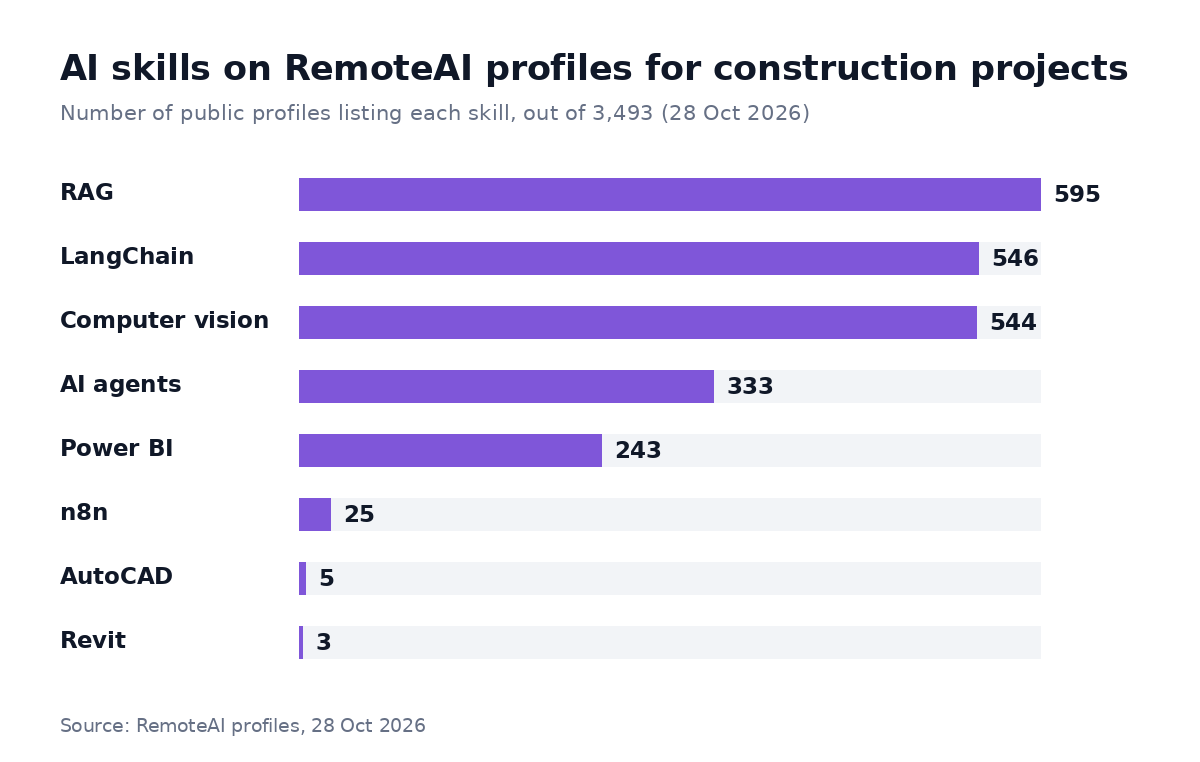
Public RemoteAI profiles listing each skill, out of 3,493, counted on October 28, 2026. Computer vision includes OpenCV, YOLO and object detection. Skills are what each person lists on their profile.
So write the brief in construction terms. A developer who knows RAG can learn what an RFI is in an afternoon if your brief explains it, but they can't guess your document system or your approval steps.
Risks: data quality, adoption and liability
Most AI projects in construction fail for ordinary reasons. Here are the three to plan for:
- Data quality. Scanned drawings, inconsistent file names and specs spread across email make every tool worse. Before a pilot, gather one project's documents in one place and check they open and search cleanly.
- Adoption. A tool the field doesn't use produces nothing. Pick one superintendent or estimator as the owner, train them first, and measure use weekly.
- Liability. AI drafts; people sign. Quantities, RFI answers and safety calls stay the responsibility of the person and company who issue them. Keep a record of who checked each AI output, and ask your insurer and counsel how AI use affects your contracts.
How to start: a first project in 4 steps
A first project should be small enough to finish in four to eight weeks and measured by one number. Here's how to scope it this week:
- Pick one job. For most firms that's takeoff on one trade, or questions over specs on one live project.
- Write down today's number. Hours per takeoff, days to answer an RFI, or photos reviewed per week.
- Test on past work first. Run the tool or prototype on finished projects where you know the right answer.
- Decide buy or build. If a product covers 80% of the job, buy it. If not, write a one-page brief and get quotes from specialists for a fixed-scope pilot.
Our guide to the implementation of AI covers the pilot-to-rollout step in more detail.
Find a specialist for your construction AI project
Have a document assistant, bid-matching workflow or computer vision pilot in mind? Post your project on RemoteAI with the brief above. Include your document system, the number of files and how you'll judge success, then compare the specialists who apply.
The Free plan covers one job a month, open for 14 days; jobs from companies whose website is not verified yet are reviewed first. You can also browse AI agent developers and computer vision engineers and message them once your plan includes contact credits (free posts get them after your company website is verified).
Method and sources: AGC and Sage, 2026 Construction Hiring and Business Outlook (press release, January 8, 2026; read October 28, 2026). U.S. Bureau of Labor Statistics, Census of Fatal Occupational Injuries 2024 (released February 19, 2026; read October 28, 2026). Vendor pages read October 28, 2026: Togal.AI, Procore AI, Autodesk Construction IQ, Oracle Construction and Engineering Intelligence user guide, ALICE Technologies, OpenSpace, Buildots, ConstructConnect Project Intelligence. Standards and data: AEM, ISO/TS 15143-3; GSA, SAM.gov Get Opportunities Public API. Vendor accuracy and savings figures are the vendors' own claims. RemoteAI figures: public talent profiles (3,493) counted by skill on October 28, 2026; the dataset sizes come from RemoteAI's computer vision hire page.