Computer vision retail use cases come down to one idea: cameras that tell staff where to look. The ones retailers run today, with results they can measure, are empty-shelf alerts, self-checkout loss prevention, queue detection, foot-traffic heatmaps, planogram checks, receiving and warehouse checks, smart carts, and visual search online. Each solves one measurable problem in one place.
If you run stores or an online shop, you have probably heard bigger promises: stores with no checkout at all, robots in every aisle. So what actually works? This guide walks through eight use cases, what each one needs, what a build costs, and where retailers get it wrong.
| Use case | Cameras needed | Time to a first result | Main metric |
|---|---|---|---|
| Empty-shelf alerts | New shelf cameras or staff phone photos | A pilot of 6 to 8 weeks | Hours with an empty facing |
| Self-checkout loss prevention | One camera above each lane | A pilot of 6 to 8 weeks | Shrink at those lanes |
| Queue detection | Existing ceiling cameras | A few weeks | Average wait time |
| Foot traffic heatmaps | Existing ceiling cameras | About a month of data | Visits and stops by aisle |
| Planogram compliance | Staff phone photos | A few weeks | Bays matching the plan |
| Receiving and warehouse checks | Cameras at the dock or packing station | A pilot of 6 to 8 weeks | Miscounts and damage caught |
| Smart carts | Cameras on the cart (vendor) | A vendor pilot | Basket size, checkout time |
| Visual search and tagging | None (your product photos) | A few weeks | Search use and conversion |
What computer vision does in a store
Computer vision is software that reads images or video and turns what it sees into a decision. In retail, the image comes from a ceiling camera, a shelf camera, a phone or a product photo. The decision is usually small: this shelf is empty, this item was not scanned, six people are waiting at register two.
That is why the useful projects are narrow. For example, a model that only has to answer "is there a gap on this shelf?" can often be trained on a few thousand labeled photos and tested in one aisle.
A model that has to understand everything that happens in your store is a research project.
The scale of the problem explains the interest. US retailers lost $112.1 billion to shrink in 2022, according to the NRF National Retail Security Survey 2023.
Out-of-stocks, long lines and misplaced products cost you sales in a quieter way. Vision systems target both.
1. Empty-shelf and out-of-stock alerts
Shelf monitoring is the most common starting point because the result is easy to measure: fewer hours with an empty facing.
Cameras fixed above or across an aisle take a picture every few minutes, a model finds gaps, and a store associate gets an alert such as "aisle 7, oat milk, 2 facings empty."
What it needs: cameras with a clear view of the shelves, photos of your shelves in different light, and a list of products by position. What to measure: time from gap to refill, and sales on the products you watch compared with stores without cameras.
This use case also shows the limits. Walmart ended its shelf-scanning robot program with Bossa Nova in 2020, as reported by The Wall Street Journal, after finding that simpler solutions, including its own store workers, did the job about as well. Fixed cameras and phone photos taken by staff are now the cheaper route for most chains.
2. Self-checkout loss prevention
At self-checkout, a camera above the scanner compares what goes into the bag with what was scanned. When an item passes without a beep, the screen asks the shopper to rescan it, or your attendant gets a quiet alert.
What it needs: one camera per lane, video of real transactions (with the store's consent rules in place), and labels for the common mistakes: an item left in the cart, two items scanned as one, a heavy item weighed as produce. What to measure: shrink at those lanes before and after, and how often the alert is wrong.
A system that stops honest shoppers every few minutes costs you more in lost goodwill than it saves.
3. Queue detection at the registers
Queue detection counts people waiting and tells managers to open another register before the line gets long. It works with ceiling cameras that already exist in many stores, because the model only needs to see bodies from above, not faces.
This is often the fastest win. You need little new hardware, the alert rule is simple, for example "more than four people at two lanes for two minutes," and the result shows up in wait times within weeks.
4. Foot traffic and store heatmaps
The same ceiling cameras can count how many people enter, which aisles they walk, and where they stop.
Over a month, that becomes a heatmap that shows you things such as the end cap nobody sees, the promotion that pulls people into the back of the store, or the hour when staffing is too thin.
A limit to keep in mind: a heatmap tells you where people go, not why. Pair it with sales data by aisle before you move a whole department.
5. Planogram compliance
A planogram is the plan for which product goes where on a shelf. Brands pay for placement, so checking it matters. Staff or merchandisers take a photo of each bay with a phone, and a model compares it with the plan: missing products, wrong position, wrong price tag.
This use case is popular with consumer brands as much as with retailers, because it turns a long manual audit into a photo per bay.
You need product images for every item you check, and a retraining routine when packaging changes.
6. Receiving, warehouse and damaged goods
Behind the store, cameras at the loading dock can count cases on a pallet, read labels and flag damaged boxes before anyone signs for the delivery. In a warehouse, the same models check that the right items went into an order before it ships.
These projects are less visible but often easier to prove: every miscount or damaged item caught has a price.
They also avoid most privacy questions, because the camera looks at boxes, not shoppers.
7. Smart carts and checkout-free stores
Checkout-free stores read what each shopper picks up and charge them on the way out. They exist, but they are expensive to run at full store size. In April 2024 Amazon said it would remove Just Walk Out from most of its US Amazon Fresh stores and use Dash Carts instead, as first reported by The Information.
Smart carts carry the cameras and a scale on the cart itself, so the system only has to watch one basket.
If you want the realistic version of "no checkout," it is a pilot with a vendor in a few stores, not a custom build.
8. Visual search and product tagging online
Online, computer vision reads product photos instead of video. A shopper uploads a picture and finds similar items.
Your catalog of thousands of products gets tags such as color, pattern and style without someone typing them by hand. Virtual try-on for glasses or makeup uses the same family of models.
For an online shop, product tagging is often the best first step: the data is your own catalog, there are no cameras to install, and better tags improve search and filters right away.
What a computer vision project costs
Costs depend on how many places the system runs and whether it has to work in real time. RemoteAI's pricing guidance for computer vision engineers gives three levels:
- Prototype, $5,000–$20,000: one use case, such as object detection for empty shelves in a few aisles, an image classification model, a data annotation pipeline and a basic inference API.
- Production system, $20,000–$80,000: real-time video analytics, a custom model, optimization so it runs fast (TensorRT or ONNX), and deployment on edge devices in the store.
- Enterprise platform, $80,000–$300,000+: multi-camera analytics, retraining pipelines and monitoring, the level a multi-store rollout usually needs.
For hourly work, the same page lists $90–$155 an hour for mid-level computer vision engineers and $155–$260 an hour for senior engineers with production experience. Cameras, edge hardware, and the time your store teams spend labeling and testing come on top, so ask for those in the estimate too.
How to start without wasting a year
Start with one use case, in one store, with one number to move. Here's an order that works for most retailers:
- Pick the problem with a price. Shrink at self-checkout, hours of empty shelves on top sellers, or average wait time. If you cannot put a number on it today, measure that first.
- Check your cameras. Ceiling cameras may be enough for queues and heatmaps. Shelves usually need new, closer cameras or phone photos.
- Collect and label real images. Detection tasks typically need 1,000 to 20,000 labeled images, according to RemoteAI's pricing guidance for computer vision engineers. Your own store photos beat stock datasets, because lighting and packaging differ.
- Run a pilot for six to eight weeks against a store without the system, then decide on the numbers.
- Plan the alert, not just the model. Who gets the message, on which device, and what do they do in the next five minutes?
Five mistakes that sink retail vision projects
- Starting with the moonshot. A checkout-free store is a multi-year program. An empty-shelf alert is a quarter.
- Training on clean photos. Real shelves have glare, shoppers in the way and half-turned boxes. Train on what your cameras actually see.
- No owner for the alerts. An alert nobody acts on is noise. Name the role that responds.
- Ignoring false alarms. Track how often the system is wrong, especially anything that stops a shopper.
- Identifying people when you do not need to. Most retail use cases work without faces.
Privacy: design it out from the start
Most of the use cases above count objects or anonymous bodies, and that is the safer design. Facial recognition is a different matter. In the EU, biometric data falls under strict GDPR rules. In the US, the FTC banned Rite Aid from using facial recognition for five years in December 2023 after its system wrongly flagged customers, many of them women and people of color. Ask any vendor or engineer what the system stores, for how long, and whether it can identify anyone.
The skills behind a retail vision system
A computer vision engineer for retail needs more than one model. They collect and label data, train and test the model, make it run on store hardware, and connect the alerts to tools your staff already use, such as a store messaging app.
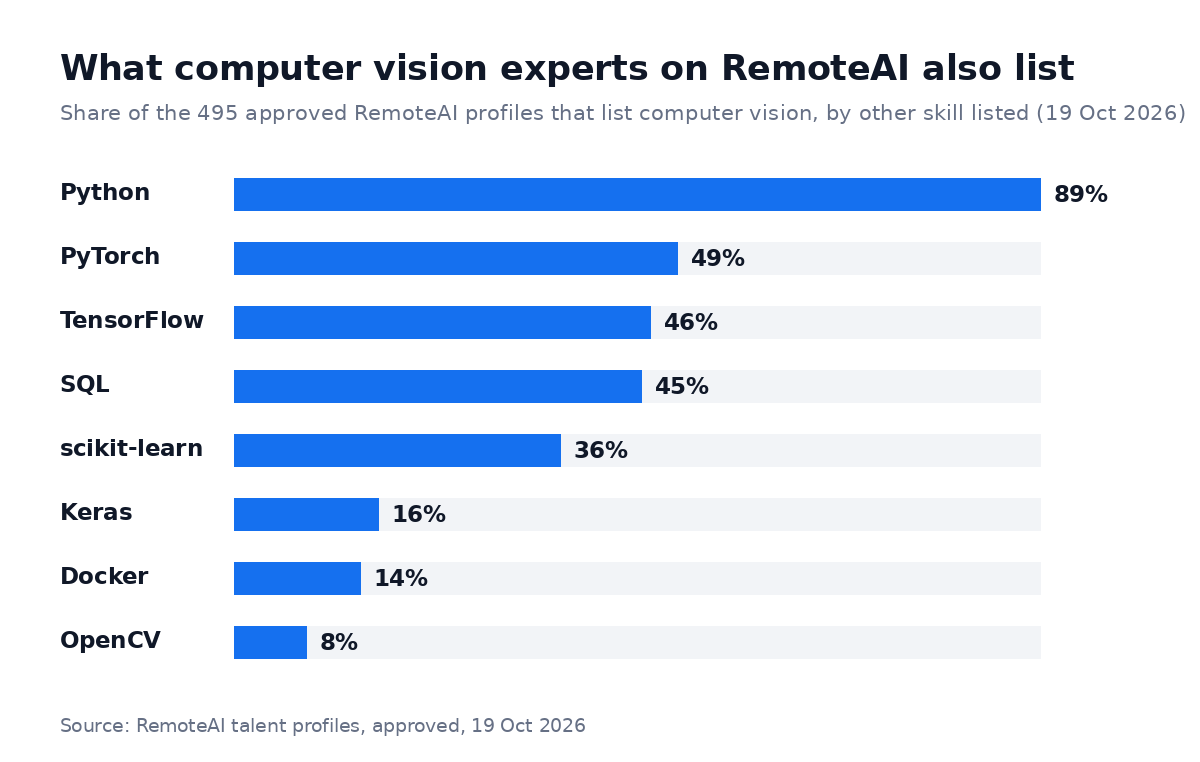
Share of the 495 approved RemoteAI profiles that list computer vision, by other skill listed. Counted on 19 October 2026 from approved talent profiles only.
On RemoteAI, 89% of the 495 approved profiles that list computer vision also list Python, 49% PyTorch, 46% TensorFlow and 45% SQL.
Only 8% name OpenCV, so ask about classic image processing directly if your project needs it. If you need edge deployment, confirm the person has shipped a model to a device such as an NVIDIA Jetson before.
When you interview, ask for one project in a messy real-world setting and how they handled labeling. Our guide to hiring an AI engineer covers the interview questions and red flags in more detail. You can also compare profiles of machine learning engineers and data science and analytics experts if your project is closer to forecasting than to cameras, or look at open computer vision jobs to see what other companies ask for.
The short version
Computer vision in retail pays off when it is narrow: one camera view, one question, one person who acts on the answer. Start with shelves, self-checkout or queues, run a pilot in one store, and judge it on a number you measured before.
Ready to scope your first pilot? Post your project and describe the store, the cameras you have and the number you want to move. To compare rates first, see what computer vision engineers charge.
Sources: NRF, National Retail Security Survey 2023 (September 2023); AP via WCJB, Walmart and Bossa Nova (November 2020); Retail Dive, Amazon Fresh and Just Walk Out (April 2024); FTC, Rite Aid order (December 2023); RemoteAI profile counts: approved public profiles that list computer vision, counted 19 October 2026, skills as listed by each person.