The implementation of AI in a small or mid-sized business works best as one narrow project: pick one task, prepare the data, run a supervised pilot, measure it, then expand. Spend most of your preparation on the scope and the data: the model can be swapped later, but a vague scope and messy data follow you into every version. You might also wonder what it really costs over a year, beyond the setup fee in a quote.
This guide gives you a 6-step plan, the six budget lines to plan for, a worked 12-month example and the questions to ask before you hire someone to build it.
What implementing AI means in this guide
This guide focuses on connecting an existing model to your business tools, not building a model of your own. A specialist connects a model such as Claude or GPT to your email, CRM or documents through an API, gives it your rules and examples, and adds checks around it. Training or fine-tuning a model is a different kind of project, with its own data and evaluation work.
Two details change the budget:
- A chat subscription is not the same as API usage. Automated workflows call the API, which is billed separately from ChatGPT and Claude chat plans. Claude Max and Team plans include monthly API credits, so check your plan before estimating extra API spending.
- Packaged services and custom projects are priced differently. A packaged service has a fixed scope and a starting price. A custom project starts from your process and is quoted on its own.
A 6-step plan for your first AI project
Here's the plan we suggest to companies starting out. Each step ends with something you can check.
1. Pick one task
Pick one task that happens often, follows rules a person could write down, and ends with a clear action. Good first candidates are sorting incoming emails, extracting fields from invoices, or drafting answers from your help center. "Use AI in marketing" is a theme; "draft a first reply to every inbound lead within 10 minutes" is a task.
2. Write the outcome in numbers
Write down what success looks like before anything is built. For example: "classify 90% of inbound emails correctly without correction" or "cut handling time from 6 minutes to 2." Set measurable targets, plus any qualitative acceptance criteria, before the pilot, so your team can judge whether it met its goals.
3. Prepare the data and the access
Prepare the data the system will read, because the answers can only be as good as that data. Collect 30 to 50 real examples with the correct outcome, including the messy ones, as a starting test set. It shows early whether the idea works; it doesn't prove reliability in production, so keep adding real cases during the pilot, and list every tool the system must read from or write to. Decide who grants access, and what the system may never touch.
4. Choose: packaged service, custom project or in-house
Choose the route that matches the task, not the most impressive one:
| Route | Fits when | Price reference on RemoteAI |
|---|---|---|
| Packaged service | One standard workflow, clear scope | Starting prices RemoteAI suggests to specialists: about $150 for a simple automation to $1,500 for a multi-step AI agent. You agree the final scope with the specialist. |
| Custom project | Several tools, messy data, approvals | RemoteAI's pricing guidance for specialists: simple AI workflow about $1,000–$6,000; multi-step pipeline $6,000–$35,000 |
| In-house | You have engineers with production AI experience | Their time, plus the same running costs |
Both columns come from RemoteAI's pricing guidance for specialists (October 2026): packaged starting prices, and typical ranges for custom projects. A specialist quotes your exact scope.
5. Run a supervised pilot
Run the first version on real work, with a person approving every output before it takes effect. Log each correction. The correction rate over the first two weeks shows where the system is weak and whether it can get more autonomy. According to Fiverr's 2026 guide to custom AI agents, a narrow first pilot usually takes four to eight weeks, and preparing the data often takes longer than the build.
6. Measure, then expand one step at a time
Measure the numbers from step 2, then remove the approval only where the system is reliable. Expand to the next task once the first one has paid for itself. A narrow start can also reduce later work, when the next tasks can reuse the same integrations, access rules and evaluation process.
What AI implementation really costs: six budget lines
A setup quote is only one line of the budget. A 12-month budget needs six:
| Budget line | What to write down |
|---|---|
| Setup | Deliverables, integrations, tests, and what is excluded |
| Usage | Which model, the billing unit, the volume you expect, extra fees |
| Fixed fees | Subscriptions, licenses, phone numbers, platform plans |
| Data | Who prepares, checks and updates the information the system uses |
| Running | Monitoring, support, fixes when a tool or a model changes |
| Your team's time | Approvals, training, managing the specialist |
Then add it up: setup + 12 months of usage + 12 months of fixed fees + planned maintenance, and list your team's hours next to it. State the currency and the volumes, and don't count twice what a package already includes.
A worked example: 12 months of AI email triage
Here is a hypothetical example, to show how the lines add up. A 15-person service company receives about 1,500 customer emails a month. It wants AI to sort each email, draft a reply and route it, with a person approving before anything is sent.
- Setup: we assume $400, in line with RemoteAI's suggested "Standard" package (one workflow, up to 15 steps, an AI step, documentation). That price fits a single mailbox with clear rules. If triage needs your CRM, several mailboxes or messy data, it becomes a custom project, which RemoteAI's pricing guidance puts at about $1,000–$6,000.
- Usage: one model call per email, with about 1,500 tokens read (the email plus your instructions and context) and 300 written, and no retries. According to Anthropic's pricing page, Claude Sonnet 5.5 costs $2 per million tokens in and $10 out, so each email costs about $0.006, or about $9 a month. A smaller model such as Haiku 5.5 would cost well under $1 a month for the same volume.
- Fixed fees: an n8n Starter cloud plan, €20 a month billed annually, for 2,500 workflow executions a month, so €240 a year.
- Running: we assume one hour of specialist time a month for checks and fixes, at $80 an hour: $960 a year. Rates vary with experience and country, so replace this with your specialist's quote.
- Data and your team's time: about 6 hours to write the routing rules and collect 50 example emails, then about 30 seconds per approval, about 12.5 hours a month, or roughly 156 hours in year one.
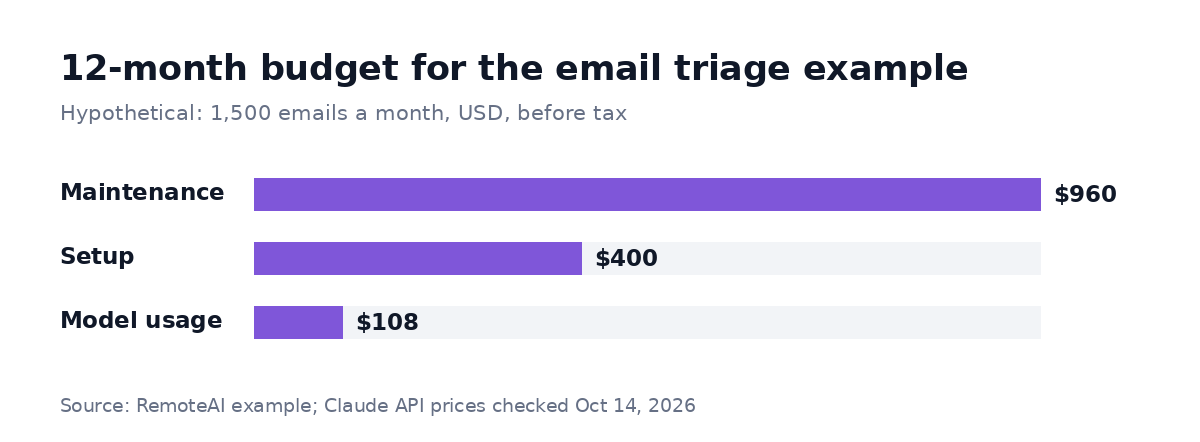
Hypothetical example. Model usage at Claude Sonnet 5.5 API prices, n8n Starter plan (€240 a year, not shown in USD), maintenance assumed at one hour a month at $80; prices before tax, checked October 14, 2026. Batch processing can lower token prices when the workflow can run asynchronously; prompt caching can lower input costs when cache reads outweigh the extra cache-write charges. With a custom setup at $1,000, the year-one total would be about $2,070 plus €240.
In other words, the model is the smallest line. Assuming no API credits apply, year-one cash spending is about $1,470 plus €240, before tax, not counting the 156 hours of your team's time. With a custom setup at the low end of that range, it would be about $2,070 plus €240. In both cases, the biggest recurring cash line is maintenance, not model usage. Your team's approval time is the cost to watch: if approvals don't shrink after the pilot, the rules or the examples need work.
Challenges of AI implementation
Watch for five common mistakes:
- A vague scope. "Help the operations team" has no finish line. Write one task and one number.
- Messy data. A system pointed at outdated documents will repeat outdated answers with confidence.
- No test set. Without real examples with known answers, "it seems better" is the only measure. Start with 30 to 50 and keep adding the cases the pilot gets wrong.
- Removing review too early. Keep approval for anything that reaches a customer, moves money or changes records.
- Forgetting the running costs. Models, tools and your processes change; someone must own the fixes.
Implementing AI responsibly
Responsible implementation is mostly the same discipline. Give the system only the access it needs, keep a person in charge of decisions that affect customers or money, tell people when they are talking to an AI, and check where your data is processed and stored. Once tested, these controls reduce the risk of harmful actions and help your team see what the system may and may not do.
Questions to ask before you hire
Ask every specialist the same questions, so you can compare answers:
- Can you show a similar workflow running on real data?
- How will we measure quality, and on which examples?
- What happens when the AI is unsure, or a connected tool is down?
- What is included in the price, and what will cost extra later?
- What will the model usage and the tools cost per month at our volume?
You can also send them this short brief, filled in with your details:
Task: [what the system should do] for [team], about [volume] a month. Success: [the number from step 2]. Tools: [email, CRM, documents] it reads from or writes to. Review: a person approves [which actions] before they happen. Budget and date: [range], pilot by [date].
Your next step
If you already know the task, compare AI automation specialists or post your project with the brief above, and let specialists come to you. If the project needs custom models or a larger system, see AI and machine learning engineers. If you don't know yet which task to start with, an AI implementation consultant can run an AI readiness assessment first.
For examples of first projects, read our guides to an AI agent for business, AI document processing and n8n workflow automation.
Sources: Claude API pricing and n8n pricing, checked October 14, 2026; Fiverr, How to Build Custom AI Agents to Automate Business Operations (Lior Iluz, September 2026). RemoteAI pricing guidance for specialists (packaged starting prices and custom project ranges), October 2026.