In most companies, someone still opens PDFs and types what they see into another system: supplier invoices into accounting, purchase orders into the ERP, application forms into the CRM. It is slow, it is boring, and every copy is a chance for a typo.
AI document processing does that work for you: it reads the document, pulls out the fields you need, checks them and sends them where they belong. The real question is whether you can trust what it extracts. This guide explains how it works, what it really costs, how accurate it is, and how to set it up so you can trust the result.
How AI document processing works
A modern pipeline has five steps:
- Intake. Documents arrive by email, in a shared folder, through an upload form or from a scanner. The pipeline picks them up automatically.
- Reading. Text recognition (OCR) turns scans and photos into text; typed PDFs often already contain it. A language model then reads the page like a person would — understanding that "Total due" next to a number is the amount to pay, even on a layout it has never seen.
- Extraction. The model returns the fields you defined — supplier, invoice number, date, VAT, line items, total — in a clean, structured format.
- Validation. Rules check the result: does the total equal the sum of the lines plus tax? Is the supplier in your system? Is the date plausible? Is this invoice number already paid?
- Delivery or review. Documents that pass go straight to your spreadsheet, accounting software or ERP. The rest wait in a review queue, where a person fixes them in seconds.
The validation step is what separates a demo from a system you can trust. Most of the value comes from catching the few documents that are wrong — not from reading the many that are right.
What it costs
Running costs are small because a model reads a page for a fraction of a cent. A one-page document is roughly 1,500 tokens of text for the model to read and a few hundred to write back. With current Claude prices, that is about $0.0003 per page with Haiku 5.5 and $0.006 with Sonnet 5.5. Scanned images cost more to read than text, but stay in the same range.
The real comparison is with the time spent today. According to the U.S. Bureau of Labor Statistics, information clerks earn a median of $21.84 an hour (May 2025), so here's what 1,000 documents cost:
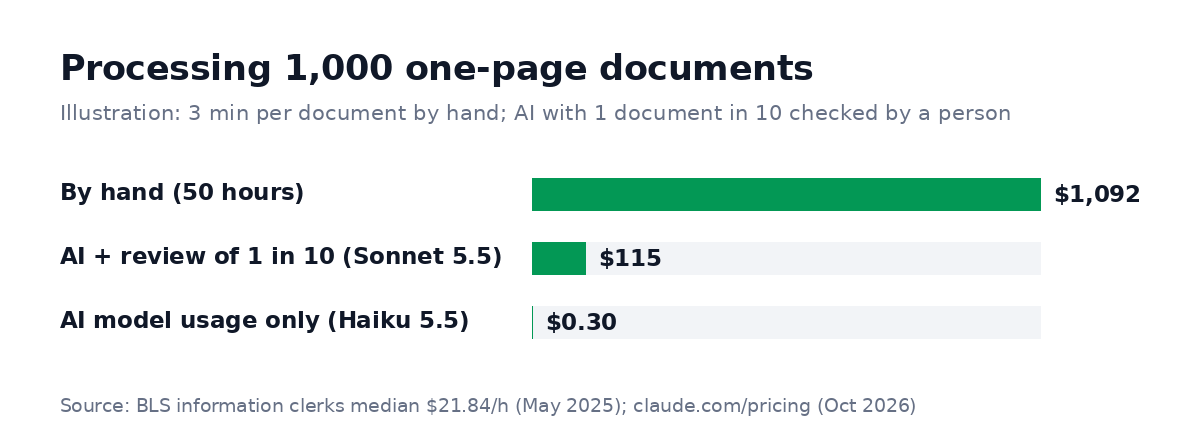
Illustration: 3 minutes per document by hand at the US median wage for information clerks ($21.84 an hour, BLS, May 2025); AI prices from claude.com/pricing, October 2026.
The setup is the main cost: defining the fields, writing validation rules, connecting your systems and testing on real documents. As a guide, these are the starting points RemoteAI suggests to specialists for fixed-price extraction projects:
| Scope | Typical content | Suggested starting price |
|---|---|---|
| Essential | 1 document type, up to 10 fields, export to a spreadsheet | from about $200 |
| Standard | Up to 3 document types, validation rules, automatic import from email or a folder | from about $550 |
| Premium | Connection to your accounting software or ERP, review queue for unclear cases, 2 weeks of support | from about $1,200 |
Which documents work best
The documents that work best come in often, look alike and lead to a clear action:
- Invoices and receipts: the classic first project — frequent, structured, with totals you can check.
- Purchase orders and delivery notes: match them against invoices automatically and flag differences.
- Forms and applications: onboarding forms, insurance claims, loan or rental applications.
- Contracts: extract dates, parties, amounts, renewal and termination clauses into a register.
- Identity and compliance documents: possible, but with strict rules on data protection and storage.
That's why invoices pay off first. Rare, one-off documents rarely justify a pipeline, because the setup costs more than the time they take by hand.
How accurate is it?
Accuracy depends more on your documents than on the AI:
- Typed PDFs from accounting systems read very reliably.
- Clean scans read well; resolution and contrast matter.
- Phone photos, handwriting and stamps need a human review step.
- New layouts are handled far better by language models than by older template-based tools, which needed a template per supplier.
Do not trust a vendor's accuracy figure — measure your own. Take 100 real documents, run them through the pipeline, and count field by field what was right. That number decides how much review you keep. For example, if 97 of 100 totals are right but only 80 supplier names, you keep reviewing supplier names and let totals through.
Common mistakes
Most projects that disappoint make one of these five mistakes:
- No validation. Extracting without checking totals and duplicates just moves errors faster.
- Automating everything at once. Start with one document type and one destination.
- Removing the human too early. Keep a review queue until the error rate on your own documents is low and stable.
- Ignoring data protection. Check where documents are processed and stored, especially for personal or financial data.
- No owner. Someone must handle the review queue and update the rules when suppliers change their invoices.
Tools and approaches
You can set it up in three ways, from fastest to most flexible:
- All-in-one platforms for invoices and receipts, often built into accounting software — fastest for standard needs.
- Cloud document AI services from the large cloud providers — strong OCR and pre-trained models for common documents.
- Custom pipelines with a language model, validation rules and your own integrations — the most flexible option when your documents or systems are specific. They are often run with automation tools such as n8n; see our guide to n8n workflow automation.
If your documents lead to decisions, such as approving, routing or replying, an AI agent can take the next step too. Our guide to the AI agent for business explains how.
Questions to ask before you buy or hire
Whether you choose a platform or a specialist, these questions sort the serious options from the demos:
- Can we test it on our own documents first? A good provider asks for your samples before quoting.
- How is accuracy measured, field by field? "95% accurate" means little without knowing which fields and which documents.
- What happens when the AI is unsure? You want a confidence threshold and a review queue, not a silent guess.
- Where is the data processed and stored, and for how long? Get it in writing, especially for personal or financial documents.
- Who maintains the rules when a supplier changes its invoice layout or you add a new field?
- Can we export everything if we change tools later?
- What does it cost at ten times today's volume? Pricing per page or per document can grow fast with your business.
Measuring the result after launch
Track a few numbers every week for the first two months:
- Straight-through rate: the share of documents that pass validation and need no human touch.
- Correction rate: the share of fields a reviewer had to fix — by field, so you know which rule to improve.
- Time per reviewed document: if reviews take longer than typing used to, the review screen needs work.
- Processing delay: how long a document waits from arrival to your system.
Most teams see the straight-through rate climb over the first weeks as rules are tightened and edge cases added. When it stabilizes, you know how much review to keep for good.
How to start
To start, follow these five steps:
- Pick one document type you process at least a few hundred times a month.
- List the fields you need and where they go.
- Collect 50–100 real examples, including the messy ones.
- Build with validation and a review queue, run it in parallel with the manual process for two weeks, and compare.
- Switch over when the accuracy is proven — and keep measuring.
You can browse AI automation and data specialists on RemoteAI, see data and analytics experts, or describe your project and get matched with people who have built similar pipelines.
Sources: Claude API pricing (October 2026); U.S. Bureau of Labor Statistics — Information Clerks (May 2025 wages). RemoteAI suggested service prices, October 2026.