AI for lead generation works best on the leads you already get: it helps every one of them get the right answer faster, instead of sending more emails. Most sales teams lose good leads today. A form filled at 9 p.m. is answered two days later, a promising company is never researched, a follow-up never goes out.
This guide covers what works, what backfires, the tools, what it costs, and what to automate first.
Where AI actually helps
AI is strong at reading, sorting, summarizing and drafting. In lead generation, that means five jobs you can hand over:
- Research and enrichment. Given a company name or website, AI collects public information — what the company does, its size, recent news, the likely decision maker — and fills in your CRM.
- Scoring inbound leads. AI reads each form, email or chat and scores it against your ideal customer: industry, size, budget signals, urgency. The best leads get a reply within minutes.
- Personalized follow-up drafts. AI writes a first reply or follow-up based on what the lead said and what you know about them. For example: "You asked about pricing for 20 seats, so here are the two plans that fit." A person reads it and sends it.
- Website chat. A chatbot answers questions from your own content at any hour, qualifies the visitor and books a call. Our guide to the AI voice agent covers the phone version.
- Routing and summaries. Every lead reaches the right person with a three-line summary, instead of sitting in a shared inbox.
The biggest gain: answering faster
Speed is the part most teams underestimate. A lead that gets a relevant answer the same hour is far more likely to book a call than one answered days later. That's why AI doesn't need to be perfect: it needs to sort the queue so your people spend their time on the best leads first.
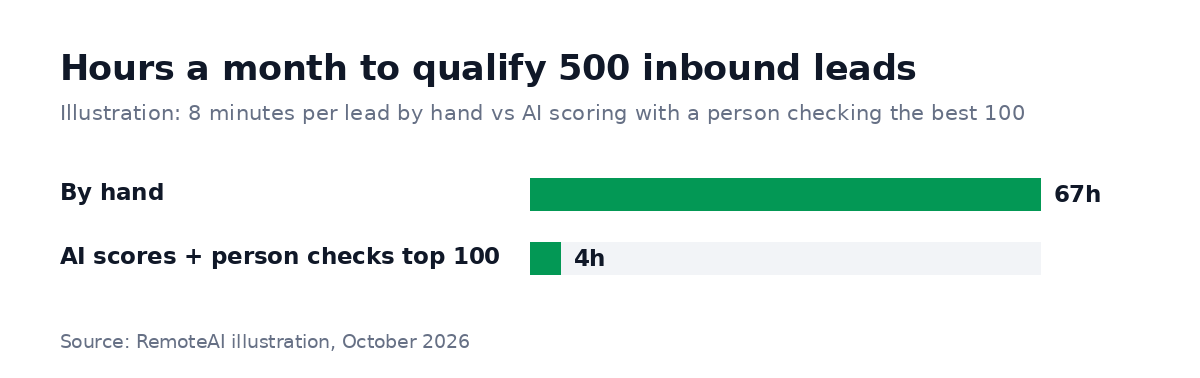
Illustration: 500 inbound leads a month; 8 minutes per lead to read, research and decide by hand; with AI, a person spends 2 minutes on each of the 100 best-scored leads.
What backfires
Some uses of AI make lead generation worse:
- Mass cold email written and sent by AI. Volume without relevance gets your domain flagged as spam, and recovering a sending reputation takes months.
- Fake personalization. "I loved your recent post" about a post the AI never read is easy to spot and damages trust.
- Agents that act without approval. Anything that reaches a prospect should be checked by a person until you have proof it is reliable.
- Bought or scraped lists with no consent. AI does not change the law, which means privacy and email rules still apply, and the brand cost of being reported is real.
- No feedback loop. If nobody tells the scoring which leads became customers, it never improves.
Tools and approaches
| Job | Typical tools | Notes |
|---|---|---|
| Enrichment and research | Data enrichment tools, your CRM's AI features | Check data quality and how the data was collected |
| Scoring and routing | CRM AI, or n8n / Make / Zapier with a language model | Start with simple rules, add AI for messy inputs |
| Follow-up drafts | CRM AI, chat assistants, custom workflows | A person approves before sending |
| Website chat | Chatbots trained on your own pages | Book calls, hand over to a person |
| Agents across tools | Custom agents with limited permissions | Best for repetitive, rule-based steps |
Many companies already pay for tools with AI features they do not use. Connecting your form, CRM and calendar with an automation tool and one AI step often delivers more than a new platform. Our guide to n8n workflow automation shows how those workflows are built, and the AI agent for business guide explains when an agent is worth it.
Example: an inbound lead workflow, step by step
Here is what a well-built first workflow does when someone fills in your contact form:
- Capture. The form entry arrives in the automation tool within seconds.
- Enrich. From the email domain, the workflow looks up the company: website, sector, approximate size.
- Score. A language model reads the message and the company data and scores the lead against your ideal customer, with one line explaining the score.
- Route. High scores go to a salesperson immediately with a summary; low scores get a helpful automatic reply with resources; spam is dropped.
- Draft. For high scores, the model drafts a reply that answers the visitor's actual question. The salesperson edits and sends it.
- Book. The reply includes a calendar link; the meeting lands in the CRM with the full context.
- Learn. Each month, compare scores with the deals that closed and adjust the rules.
Each step is simple on its own. You get the value when all of them run every time, including at night and on weekends.
AI for real estate and other local businesses
Agencies, clinics and local services get many inquiries by phone, chat and portals, often outside office hours. For them, AI helps most with the first response. For example, a chatbot or voice agent can answer availability and price questions, collect the visitor's needs and book a viewing or appointment. Keep a person in charge of anything about money, contracts or personal situations.
What it costs
The AI usage itself is usually small — often cents per lead with a small model. The real cost is the setup: defining your ideal customer, writing the scoring rules, connecting the tools and testing on real leads. As a guide, these are the starting points RemoteAI suggests to specialists for fixed-price automation projects:
| Scope | Typical content | Suggested starting price |
|---|---|---|
| Essential | 1 workflow up to 5 steps, 2 tool connections, error alert | from about $150 |
| Standard | 1 workflow up to 15 steps with an AI step (classify, summarize or write), documentation and video | from about $400 |
| Premium | Up to 3 connected workflows, AI steps and data checks, 2 weeks of support | from about $900 |
A typical first project is inbound lead routing: the form arrives, AI enriches and scores it, the CRM is updated, the right person gets a summary and a draft reply, and the best leads get a calendar link the same hour.
What to automate first
- Inbound before outbound. People who already asked are your best leads. Make sure every one gets a fast, relevant answer.
- Scoring before writing. Sorting the queue saves more time than drafting messages.
- One channel at a time. Start with your contact form, then email, then chat.
- Human approval on everything external for the first weeks.
- Measure the right thing: time to first reply, meetings booked and deals won — not emails sent.
How to know it works
Track four numbers before and after, for at least a month:
- Time to first reply for inbound leads.
- Share of leads that book a call.
- Time your team spends qualifying each week.
- Deals won from AI-handled leads, so the scoring can be tuned on real outcomes.
If replies are faster but meetings do not move, the problem is the message or the offer, not the automation.
Who builds this
Lead generation automation sits between sales operations and software. Look for someone who has connected a form, a CRM and a calendar with an AI step before, who asks about your ideal customer before quoting, and who plans a human approval step. On RemoteAI you can browse AI automation specialists, see all AI experts, or describe your project and get matched with people who have built similar workflows.
Sources: RemoteAI suggested service prices, October 2026. The time comparison is an illustration based on the stated assumptions.