The Claude Team plan costs $20 per Standard seat a month billed annually, or $25 billed monthly, and $100 per Premium seat billed annually, or $125 monthly, according to Claude's pricing page on November 13, 2026. A team needs at least 2 seats and can have up to 150, and you can mix the two seat types.
What to know before you buy:
- The seat type is the main decision. Premium costs five times more and gives five times the usage of Standard.
- Both seat types include Claude Code. You do not need Premium for developers who use it lightly.
- Running out need not be a hard stop, if an owner has bought usage credits, billed at API rates.
- Enterprise is a different model. A low seat fee, then every message billed at API rates.
What the Team plan costs
Here are the plans side by side, from Claude's pricing page (US dollars per person per month, before tax):
| Plan | Billed annually | Billed monthly | Who it is for |
|---|---|---|---|
| Pro | $17 | $20 | One person |
| Team, Standard seat | $20 | $25 | Teams of 2 to 150 |
| Team, Premium seat | $100 | $125 | Heavy users in a team |
| Enterprise | $20 per seat + usage at API rates | Not offered | 20+ seats, annual |
Max, the individual plan with five times Pro's usage, is listed at $100 a month. A Team Premium seat costs the same only on yearly billing ($125 monthly) and needs at least two seats, but it adds the team features and, per the help center, 6.25x Pro's per-session usage.
Standard vs Premium seats
The two seats share every Team feature. The difference is how much you can use Claude before hitting a limit. Anthropic's help center puts a Standard seat at "1.25x the Pro plan's per-session usage allowance" and a Premium seat at "6.25x," and both have a weekly limit across all models.
A simple way to assign them:
- Standard for people who write, research and summarize a few times a day: sales, marketing, operations, managers.
- Premium for people who keep Claude open all day, such as developers working in Claude Code or analysts running long documents.
You can move a person between seat types later. Upgrades are prorated and charged right away; downgrades take effect at renewal, according to the help center.
What Team adds over individual Pro accounts
Buying Pro for each person costs less per seat, but the company loses control. According to Claude's pricing page and help center, Team adds:
- Central billing and admin controls, including spend limits and role-based permissions.
- Single sign-on (SSO) and domain capture.
- Connectors to tools such as Google Drive, Gmail, GitHub, Microsoft 365 and Slack, with admin control over which ones people can use.
- Shared projects for team documents and instructions.
- No model training on your content by default. Individual Pro accounts have an opt-out setting instead.
The pricing page's comparison table also shows what Team does not include: SCIM, audit logs, a Compliance API and custom data retention. Those are Enterprise features.
Usage credits and the pooled API credits
When a person reaches their limit, they do not have to stop. Team owners "can pre-purchase usage credits," billed at standard API rates, and can turn on auto-reload and spending limits. The help center adds that credits expire 12 months after purchase and are non-refundable.
Team plans also come with pooled API credits for building with Claude through the API. The help center says the credits for all seats go into "one monthly balance, capped at $500." Its own example: 3 Standard and 2 Premium seats give $260 a month.
What a team of 10 pays
Take a company of 10 people: 8 who use Claude a few times a day and 2 developers who use Claude Code most of the day.
- Billed annually: 8 × $20 + 2 × $100 = $360 a month, or $4,320 a year.
- Billed monthly: 8 × $25 + 2 × $125 = $450 a month.
- Everyone on Premium, in case of doubt: 10 × $100 = $1,000 a month billed annually. That is the most common way to overpay.
- Ten separate Pro accounts: $170 a month billed annually, with slightly less usage each (Standard is 1.25x Pro), and without SSO, admin controls or the no-training default; billing is not central.
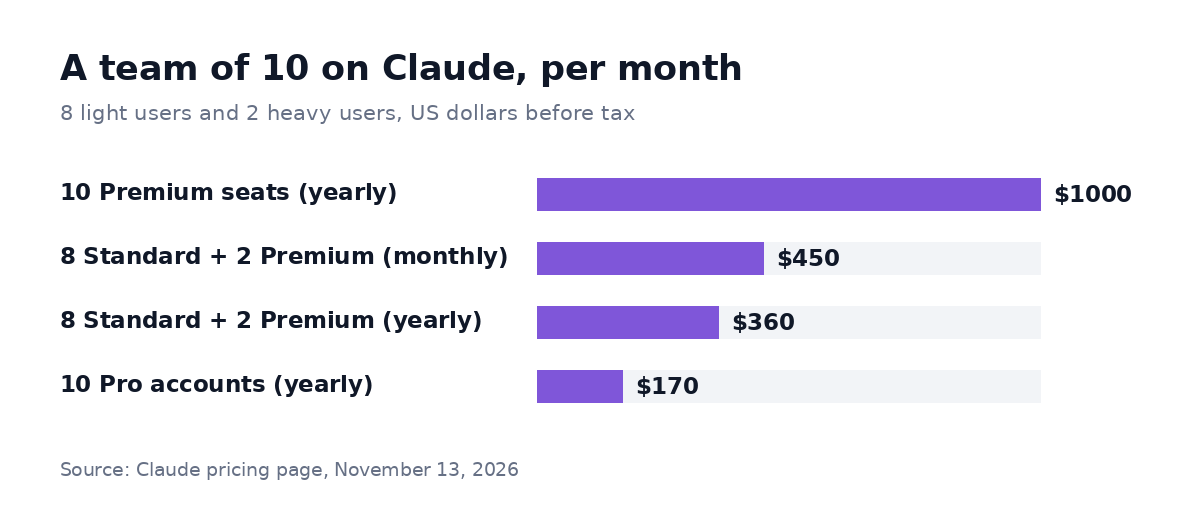
Figure: monthly cost of four ways to equip the same team of 10, from Claude's pricing page on November 13, 2026 (US dollars before tax; usage credits not included).
Start with Standard seats for everyone except the people you already know are heavy users, and after a month, upgrade only the people who keep hitting their limits.
Questions to settle before you buy
A short list saves a second purchase a month later:
- Who are the heavy users? Count the people who would use Claude for hours a day. That number is your Premium seats; everyone else starts on Standard.
- Yearly or monthly? Yearly saves $5 a month on each Standard seat and $25 on each Premium seat, but you commit for the year. Pay monthly for the first month if you are not sure who will use it.
- Which tools should Claude reach? List the connectors you need, such as Google Drive or Slack, and who may switch them on.
- Will anyone build on the API? If yes, the pooled API credits cover early tests before you need a separate budget.
When Enterprise makes more sense
Enterprise works differently. The seat fee is $20 a month billed annually with a 20-seat minimum on the pricing page, and "the seat fee covers access only, and all usage is billed separately at API rates," according to the help center. There are no per-seat limits; admins set spending limits instead.
Consider it when you need:
- More than 150 seats.
- Compliance controls: SCIM, audit logs, custom data retention, a Compliance API, customer-managed encryption keys.
- Usage that varies a lot between people, so paying per message is cheaper than buying Premium seats for everyone.
Below 20 people, the minimum alone costs more: a team of 10 would pay for 20 seats, $400 a month, before any usage. A Team seat already includes a usage allowance.
Getting value from the plan
The plan is the easy part. Teams get the most out of Claude when someone connects it to their own documents and tools, sets up shared projects with clear instructions, and builds the first workflows. If you have no one to do that internally, an AI implementation consultant can set it up for you. For work that calls the API, such as an internal assistant or an agent, look at AI agent developers. Our guide to the implementation of AI walks through the steps and a 12-month budget.
What RemoteAI data shows
On November 13, 2026, 47 public profiles on RemoteAI listed Claude as a skill, against 487 for the OpenAI API. Of the roughly 1,970 job ads we import from AI companies' career pages, 49 asked for Claude. On our site, about ten times more profiles list the OpenAI API than Claude, so if your team will build on Claude, ask candidates which model they used in production. For hiring questions beyond Claude, see how to hire an AI engineer.
The short version
Buy Team when at least two people use Claude for work and you want central billing, SSO and no training on your content by default. Put most of your people on Standard seats at $20 or $25 and give Premium to your few heavy users. Look at Enterprise only when you need compliance controls or more than 150 seats.
Sources: Claude pricing; Anthropic help center: What is the Team plan?, How is my Team plan bill calculated?, Purchase and manage seats on Team plans, Manage usage credits, What is the Enterprise plan?. All read November 13, 2026; prices in US dollars before tax and subject to change. RemoteAI figures from our database the same day.