DeepSeek's API charges per million tokens, and the price depends on three things: the model, whether your input was cached, and the time of day. On DeepSeek's pricing page on November 13, 2026, deepseek-flash cost $0.3 per million input tokens and $1.2 per million output tokens at peak times, and deepseek-v4-pro cost $1.32 and $3.96. Outside peak hours, every price is half.
What to know before you build on it:
- Two models are on the price list: deepseek-flash and deepseek-v4-pro.
- Cached input is far cheaper. A repeated prompt prefix costs a small fraction of a fresh one.
- Peak hours are short. Weekdays 01:00–04:00 and 06:00–10:00 UTC; everything else, including weekends and Chinese public holidays, is off-peak.
- The page shows prices with a $ sign (it does not name the currency) and says DeepSeek "reserves the right to adjust them."
DeepSeek API prices per model
Here are the prices from DeepSeek's pricing page, per million tokens (off-peak / peak):
| Price per 1M tokens | deepseek-flash | deepseek-v4-pro |
|---|---|---|
| Input, cache hit | $0.003 / $0.006 | $0.022 / $0.044 |
| Input, cache miss | $0.15 / $0.3 | $0.66 / $1.32 |
| Output | $0.6 / $1.2 | $1.98 / $3.96 |
Both models have a 1-million-token context and support thinking and non-thinking modes, according to the pricing page. deepseek-flash points to "DeepSeek-V4.1-Flash-1017" and supports images; deepseek-v4-pro points to "DeepSeek-V4-Pro-0813" and does not. DeepSeek also sells web Search and Fetch tools at $0.75 per 1,000 successful requests each.
How peak and off-peak hours work
DeepSeek's footnote is precise: "Off-peak rates are half of the peak rates. Peak hours are 01:00 - 04:00 and 06:00 - 10:00 UTC, Monday through Friday, excluding Chinese public holidays." That makes seven peak hours on a weekday. In Paris (UTC+1 in winter) that is 02:00 to 05:00 and 07:00 to 11:00; in India (UTC+5:30), 06:30 to 09:30 and 11:30 to 15:30.
Two practical consequences:
- Batch jobs belong off-peak. Re-indexing documents, scoring a backlog or running evaluations at night or on a weekend costs half.
- Live traffic during peak hours costs the full rate, so estimate your bill at peak prices if most of your users are active then.
What cache hits mean for your bill
A cache hit happens when the start of your prompt repeats a recent request, for example the same long system prompt or the same document before each question. On deepseek-flash at peak, a cached million input tokens costs $0.006 instead of $0.3, a fiftieth of the price.
To get more cache hits:
- Put the fixed part first: instructions, examples and reference text at the start of the prompt, the user's question at the end.
- Keep that fixed part identical between requests; a changed timestamp or ID near the top breaks the match.
What a real app costs a month
Take a support assistant that answers 10,000 questions a month. Each request sends 2,000 input tokens (instructions plus retrieved help articles) and gets back 500 tokens. That is 20 million input tokens and 5 million output tokens a month. The traffic numbers are our assumption for the example.
- deepseek-flash, all at peak, no cache hits: 20 × $0.3 + 5 × $1.2 = $12 a month.
- deepseek-flash, all off-peak: $6 a month.
- deepseek-v4-pro, all at peak, no cache hits: 20 × $1.32 + 5 × $3.96 = $46.20 a month.
- deepseek-flash at peak with half the input cached: 10 × $0.006 + 10 × $0.3 + 5 × $1.2 = $9.06 a month.
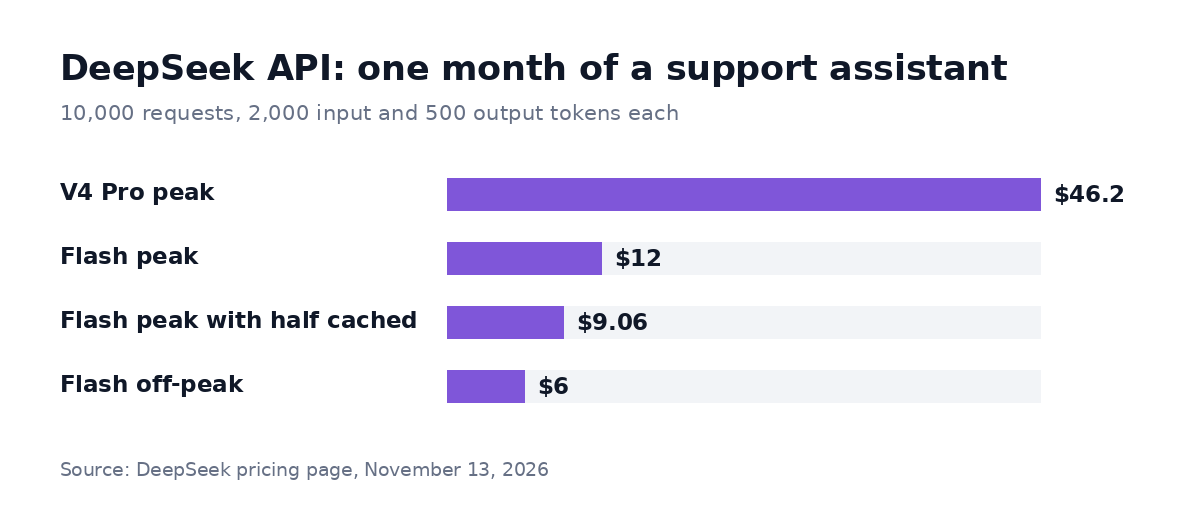
Figure: monthly cost of 10,000 requests (2,000 input and 500 output tokens each) under four setups, from DeepSeek's pricing page on November 13, 2026. Traffic is an assumption for the example.
At this size the API bill is small next to the time spent building and checking the assistant (our guide to AI development cost covers that side). The model price starts to matter at millions of requests a month, or when each request sends very long documents.
How to estimate your own bill
You can price your own use case in four steps, with nothing but a spreadsheet:
- Measure a typical request. Log 20 real requests and note the input and output tokens of each; most SDKs return both counts with every answer.
- Split the input. Count how much of each prompt is the same every time (instructions, examples, a document reused across questions). That part can become a cache hit; the rest is a cache miss.
- Count requests per month and when they happen. A chat feature used during office hours in Asia lands mostly in peak hours; a nightly job lands off-peak.
- Multiply. Monthly cost = (cached input × cache-hit price) + (fresh input × cache-miss price) + (output × output price), each in millions of tokens, at the peak or off-peak rate that matches your timing.
Run the same sheet with deepseek-v4-pro prices. If Pro only fixes a small share of answers, send just those cases to Pro and keep the rest on Flash.
Billing, balance and limits
DeepSeek bills from a prepaid balance. The pricing page says fees are "directly deducted from your topped-up balance or granted balance, with a preference for using the granted balance first when both balances are available." Cost is simply tokens times price.
DeepSeek limits the number of requests running at once, counted per account. Its rate-limit page lists 2,500 concurrent requests per account for deepseek-flash and 500 for deepseek-v4-pro; above that you get an HTTP 429 error. It also says you can ask for more capacity at "no additional cost."
Model names that changed in 2026
If your code still calls deepseek-chat or deepseek-reasoner, check it. DeepSeek's changelog of April 24, 2026 said those names "will be discontinued in three months (2026-07-24)," and the current pricing page lists only deepseek-flash and deepseek-v4-pro. The older name deepseek-v4-flash is "still accepted" but retired, and is served by the current Flash model. Peak and off-peak pricing started on August 16, 2026, so cost estimates written before then are out of date.
Before you commit to one provider
The cheapest model per token is not always the cheapest app. Before you choose, run 50 to 100 of your own real requests on each candidate model and compare three numbers: the share of good answers, the cost per request, and the response time at your busiest hour. Also check the provider's terms and where your data is processed, which DeepSeek's pricing page does not state, against your own customers' requirements.
Questions to settle before you switch
If you are moving from another provider, settle these first:
- Which model names will your code call? Use the names on the pricing page today, not the ones from an older tutorial.
- What happens at 429 errors? Add retries with a short wait, and decide what users see if the limit is reached.
- Who watches the balance? Billing comes from a prepaid balance, so set a reminder before it runs out.
Getting help to build it
If you want someone to set up the prompts, caching and evaluation for you, look for engineers who have shipped an LLM feature to production: RAG engineers for assistants that answer from your documents, or AI agent developers for tools that take actions. On November 13, 2026, 619 public profiles on RemoteAI listed RAG and 559 listed LangChain. Our guide to how to hire an AI engineer covers the interview questions that separate demos from production work.
The short version
Use deepseek-flash by default, move batch work to off-peak hours, keep the fixed part of your prompts at the start to get cache hits, and price your app at peak rates if your users are active between 01:00 and 10:00 UTC on weekdays. Check the pricing page and changelog before you launch, because DeepSeek changed both its model names and its pricing model in 2026.
Sources: DeepSeek API pricing, rate limits, updates and changelog and the October 17, 2026 release note. All read November 13, 2026. RemoteAI figures from our database the same day.