The main Zapier alternatives for a business are Make, n8n, Activepieces and, for Microsoft 365 companies, Power Automate. For workflows with several steps, Make and n8n usually cost a fraction of Zapier. One 5-step lead workflow at 400 leads a month is $49 on Zapier and $9 on Make, both billed yearly (pricing pages, October 26, 2026).
What you give up is reach and simplicity. Zapier connects to 9,000+ apps and a teammate with no technical background can build a Zap alone. So the real question is not which tool is cheapest, but which of your Zaps are worth moving.
When it makes sense to leave Zapier
Here are the signs, from most to least common:
- A few Zaps use most of your tasks. Long Zaps that run often, such as lead routing or order processing, multiply tasks by every step.
- You keep moving up a tier. Zapier's Professional plan goes from 750 tasks ($19.99 a month billed yearly) to 2,000 ($49), 5,000 ($89) and 10,000 ($129). If you climb a tier every few months, look at what drives it.
- Logic is getting complex. Branches, loops over long lists and data reshaping are easier to read in Make's visual map or n8n's canvas than in a long Zap.
- Data has to stay on your servers, for example patient or payroll data. n8n and Activepieces can be self-hosted; Zapier cannot.
If your Zaps are short and your bill is small, staying is usually the right call. Paying someone to rebuild a Zap takes months of a $20 monthly saving to pay back: the starting price RemoteAI suggests to specialists for a packaged workflow of up to 5 steps is $150 (October 2026).
How the alternatives bill
Zapier counts a task for each completed action; triggers, polling, Filter, Formatter and Paths are free. The alternatives count differently:
| Tool | What it counts | Free option | First paid plan |
|---|---|---|---|
| Zapier | A task per completed action | 100 tasks a month, two-step Zaps | Professional: $19.99 a month billed yearly, 750 tasks |
| Make | A credit for most module runs | 1,000 credits a month | Core: $9 a month billed yearly, 10,000 credits |
| n8n | One execution per run, any number of steps | Self-hosted Community Edition | Starter: €20 a month billed yearly, 2,500 executions |
| Activepieces | One credit per run; AI steps extra | 1,000 free credits (FAQ: a month; plan table: daily reset); open-source self-hosting | Plus: $20 a month flat, 10,000 credits |
Pricing pages read October 26, 2026. Yearly billing saves 33% on Zapier, 17% on n8n, 15% on Make and two months on Activepieces.
In other words, Make bills per step like Zapier, but its credits are much cheaper. n8n and Activepieces bill per run, so a long workflow costs the same as a short one.
The same workflow on each tool
Take a common lead workflow: a form entry arrives, test entries are dropped, then five actions follow. Update the CRM contact, score the lead with AI, post it in Slack, send a confirmation email and log a row in a sheet. At 400 leads a month:
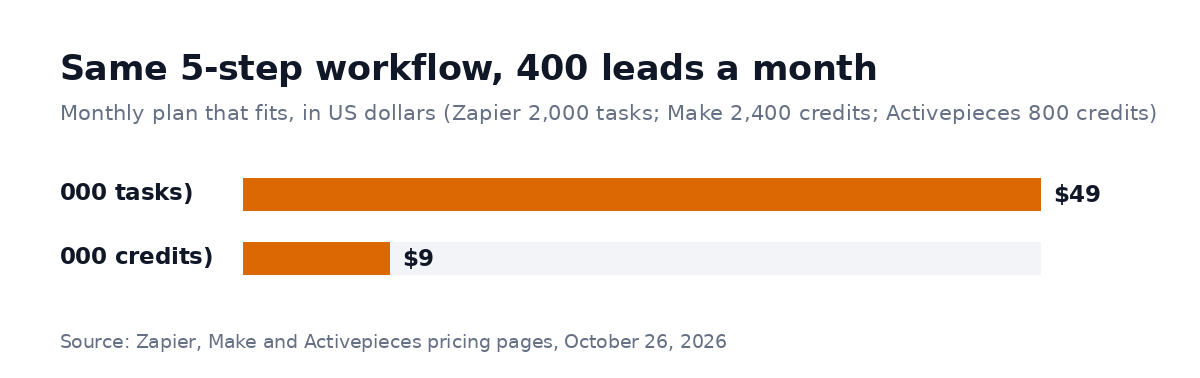
Monthly plan that fits the example workflow, billed yearly except Activepieces (flat monthly price). Pricing pages, October 26, 2026.
| Tool | Units per run | Units a month | Plan that fits | Monthly price |
|---|---|---|---|---|
| Zapier | 5 tasks | 2,000 tasks | Professional, 2,000-task tier | $49 billed yearly |
| Make | 6 credits | 2,400 credits | Core (10,000) | $9 billed yearly |
| n8n | 1 execution | 400 executions | Starter (2,500) | €20 billed yearly |
| Activepieces | 2 credits | 800 credits | Plus (10,000) | $20 flat |
How the units add up:
- Zapier: the trigger and the Filter are free; each of the five actions is a task (the AI step counted as one task, the minimum; Zapier says AI steps can use more).
- Make: its FAQ lists reading data from a webhook among the actions that use credits, so the module that receives the lead counts, plus one credit per action, with the AI step run through your own AI key; Make's built-in AI tools can use more credits.
- Activepieces: one credit for the run, plus one for the AI step when you use your own AI key, which the Plus plan allows. Through Activepieces' own models, an AI step costs 2 to 20 credits depending on the model, so the free plan's 1,000 credits would not cover this workflow.
- n8n: one execution per run, whatever the number of steps.
At 2,000 leads a month the gap grows: Zapier needs the 10,000-task tier ($129 a month billed yearly). n8n Starter (2,000 of 2,500 executions) and Activepieces Plus (4,000 of 10,000 credits) still cover it, while Make needs 12,000 credits, more than Core's 10,000, so check Make's next credit tier before you buy. Our n8n vs Zapier guide shows the math at three volumes.
What each alternative is good at
Make suits teams that want a visual editor without hosting anything. Branches, loops and data mapping are easier to follow than in a long Zap, such as a route that sends large deals to sales and small ones to a nurture list. Core allows runs every minute. Check that your apps are among its 3,000+.
n8n suits a team with someone technical, such as a developer or a data-minded ops lead. It's the cheapest at high volume on its cloud plans, and it can be self-hosted. Workflows often use expressions and small pieces of code, so plan for who maintains them. See our n8n workflow automation guide.
Activepieces is open source and billed per run like n8n, with a flat $20 Plus plan. It's a good fit for simple-to-medium workflows, such as sending new form answers to a Google Sheet and Slack, if your apps have ready-made pieces.
Power Automate makes sense if your company runs on Microsoft 365, since it connects natively to Outlook, Teams and SharePoint. Check Microsoft's pricing for your licenses before you compare.
Which Zaps to move first
Don't move everything. List your Zaps with the number of tasks each one uses a month, and sort the list. The two or three Zaps that use the most tasks are usually where most of the saving sits. Move those, and keep the short Zaps where they are: a two-step Zap that runs 50 times a month costs almost nothing.
Then rebuild each one in the new tool and run both side by side on real data for a week. Switch the Zap off only when the new workflow has handled every case, including the odd ones, such as an empty field or a duplicate lead.
What RemoteAI data shows
On October 26, 2026, 139 of the 3,480 approved public profiles on RemoteAI name n8n in their headline or description, 42 name Zapier, 33 name Make.com or Integromat and 7 name Power Automate. On the hiring side, 21 live job posts mention n8n and 13 mention Zapier.
For you, that means an n8n specialist is the easiest to find if you move your heavy Zaps there, and Zapier specialists can still help you clean up the Zaps you keep.
Hiring help for the move
A migration has a clear scope, so it's easy to price. RemoteAI's n8n, Zapier and Make experts page lists specialists who do this work. For a packaged automation, the starting prices RemoteAI suggests to specialists are $150 for one workflow of up to 5 steps, $400 for one of up to 15 steps with an AI step, and $900 for up to 3 connected workflows with AI steps and 2 weeks of support (service templates, October 2026). A larger migration is quoted separately, so ask for a fixed price per milestone with the deliverables in writing. Put these in the brief:
- Your task usage by Zap, with the top three marked.
- The target tool, or ask for the monthly cost in two tools.
- What must not break: customer emails, payments, CRM data.
- A week of side-by-side runs before switching off.
- Documentation and a short video for whoever maintains it.
You can post the project with that brief, or browse automation engineers directly.
The short version
Leave Zapier for the Zaps that cost you, not for all of them. Make is the closest move for visual builders and costs little at volume. n8n is the cheapest per run if someone technical maintains it. Activepieces bills per run with a flat plan, and Power Automate fits Microsoft 365 companies. For the same 5-step workflow at 400 leads a month, the plan goes from $49 on Zapier to $9 on Make. Check each pricing page the day you buy.
Sources: Zapier pricing (tiers, task rules, polling and built-in tools FAQ), Make pricing (credits and FAQ), n8n pricing (executions and plans) and Activepieces pricing (credits, AI steps, plans), all read October 26, 2026. RemoteAI service templates (suggested starting prices), October 2026. RemoteAI figures: approved public profiles whose headline or description names each tool and live job posts, counted October 26, 2026.