An AI readiness assessment tells you two things: whether your company can run a first AI project now, and what to fix before you spend on one. You can do a useful first pass yourself in an afternoon with 24 questions across six areas: business goal, data, tools, people, risk and budget.
What to know:
- Score each question 0 (no), 1 (partly) or 2 (yes). The total is out of 48.
- Below 20, fix the basics first. From 20 to 34, run one small proof of concept. From 35, you are ready for several projects.
- Check data first: without it, no other score matters.
- An outside assessment is worth paying for when the stakes are high or nobody in-house can judge the data. Ask for a fixed price and a written list of deliverables.
Why run an assessment before an AI project
The assessment exists to stop one expensive mistake: paying a developer to build on data you do not have, for a goal nobody owns. If you are asking yourself "are we ready, or are we just excited?", that is the right question, and the checklist below answers it with a number.
Most of the top results for this search are vendor tools. Microsoft's AI Readiness Assessment covers seven pillars: business strategy, AI governance and security, data foundations, AI strategy and experience, organization and culture, infrastructure for AI, and model management (Microsoft's page, checked October 29, 2026). Partner assessments sold on AWS Marketplace use anywhere from four to seven dimensions, depending on the vendor. These tools are useful when you already run on that cloud, but they are built around it.
The checklist here is vendor-neutral and sized for a company of 10 to 500 people that wants to start with one task.
The six areas, and what each one checks
Each area answers one question:
| Area | The question it answers | Example of a weak answer |
|---|---|---|
| Business goal | Do we know which task AI should improve, and how we would measure it? | "We want to use AI somewhere" |
| Data | Does the data for that task exist today, and can we reach it? | Answers live in people's heads or inboxes |
| Tools and systems | Can our software connect to an AI tool? | Main system has no API and no export |
| People and skills | Who will run it, and who will check its output? | Nobody has time set aside |
| Risk and compliance | Do we know what data can leave the company, and the rules that apply? | No policy on staff using ChatGPT |
| Budget and owner | Is there a budget, a decision-maker and an end date? | "Let's see what it costs" |
The 24-question checklist
Answer each question with your team in one meeting, then fill in what you could not answer within the week. Score 0 for no, 1 for partly, 2 for yes.
Business goal:
- Can you name one task you want AI to help with, in one sentence?
- Does that task repeat at least weekly, such as support emails, invoices or lead research?
- Do you know how long or how much it costs today, even roughly?
- Can someone on your team check whether an AI answer for that task is right?
Data:
- Does the data for that task exist today, in documents, tickets, a database or a shared drive?
- Can you export it or reach it through an API without a months-long IT request?
- Is it reasonably complete and current, for example less than a year old for help center content?
- Can you collect 50 to 100 real examples with the correct answer, to test an AI tool against?
Tools and systems:
- Do your main systems (CRM, help desk, ERP) have an API or a native integration with AI tools?
- Do you already use an automation tool such as Zapier, Make or n8n?
- Does someone manage your accounts and access rights, in-house or through a provider?
- Can you run a test without touching your live systems, in a sandbox or a copy?
People and skills:
- Is there one named person who owns the project, with time set aside for it?
- Has the team that does the task today agreed to try a new way?
- Does anyone on staff use AI tools at work already, even informally?
- Do you know who will build it: staff, a freelancer or an agency?
Risk and compliance:
- Do you know which of your data is personal or confidential?
- Is there a written rule on what staff may paste into AI tools?
- Do you know the rules that apply to you, such as GDPR, HIPAA or the EU AI Act?
- Will a person review the AI output before it reaches a customer, at least at first?
Budget and owner:
- Is there a budget for a first project, even a small one?
- Is the person who signs off on spending involved?
- Have you set an end date for a first test, in weeks?
- Have you agreed in advance on the number that would make you continue or stop?
How to score it, and what each band means
Add up the 24 answers for a total out of 48, and also note the score of each area out of 8. The total tells you what to do next; the lowest area tells you what to fix.
Here's how to read the total:
- 0 to 19: fix the basics first. Spending on a build now mostly pays for discovery. Name an owner, pick one task, and gather the data for it. Re-score in a month.
- 20 to 34: run one small proof of concept. You can test one task with a fixed budget and end date, while you fix the weakest area in parallel. Our AI proof of concept guide shows how to set the pass/fail number.
- 35 to 48: ready for several projects. Rank your use cases by value and effort, and plan who builds what.
These bands are our rule of thumb for a first project, not an industry standard. An area at 2 or below out of 8 is a blocker whatever the total says.
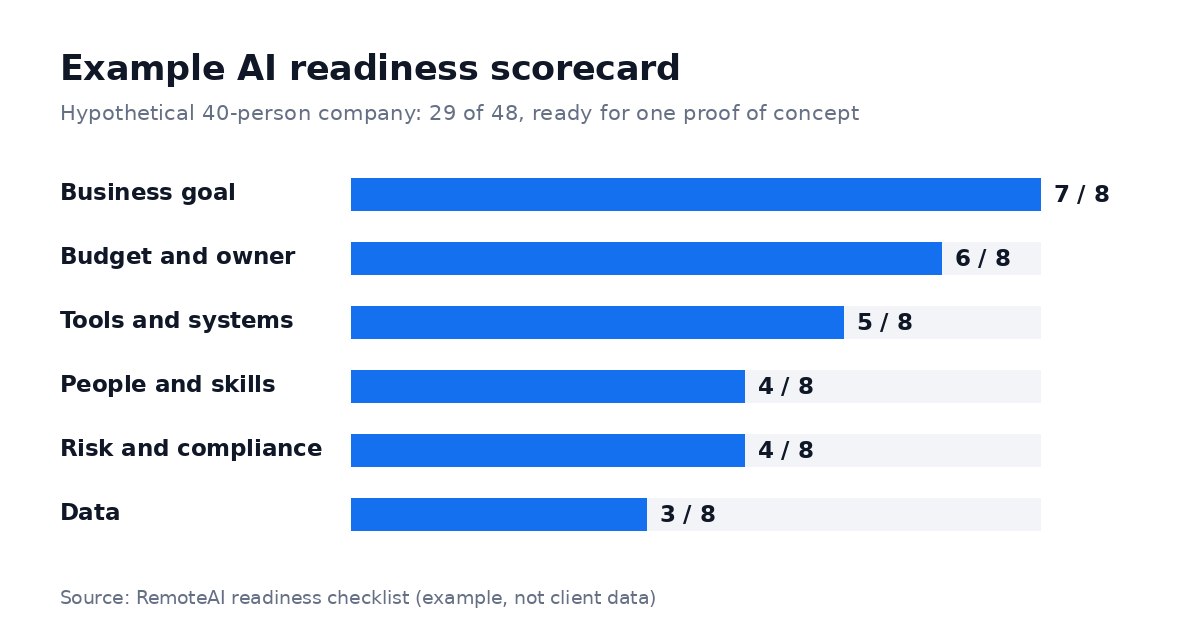
Hypothetical example for illustration, not client data.
Take the example above: a 40-person company scores 29. The goal is clear (7 out of 8) and a budget exists (6), but the data scores 3, because answers to customer questions live in two people's inboxes. The right move is a small proof of concept on a task whose data already exists, such as tagging incoming tickets, while someone moves the answers into a shared help center.
Common weak spots, and how to fix them
Five gaps block a first project more than any other. Here's what to do about each:
- No single task. Replace "AI for customer service" with a task that has a finish line: "draft replies to order-status emails from our order data". The implementation of AI guide walks through choosing one.
- Data that exists but cannot be reached. Ask your software vendor for the export or API documentation before you hire anyone. If there is none, the first project is the data pipeline, not the AI.
- No owner. A project owned by "the team" stalls. Name one person and give them a few hours a week.
- No rule on what goes into AI tools. Write a one-page rule: what data may be pasted into which tools, and who to ask. This takes a day and lowers the risk score quickly.
- No stop rule. Decide before you start what result would make you stop. Without it, a test turns into an open-ended project.
Do it yourself or hire someone?
Run the checklist yourself first: it is free and takes an afternoon. Bring in an outside consultant when one of these is true:
- Nobody in-house can judge whether your data is good enough.
- The task touches regulated or customer data, and a mistake would be costly.
- Several departments want AI and you need one ranked list, with costs, to decide.
Here are the starting prices RemoteAI suggests to specialists for a packaged assessment in its service templates (October 2026). A consultant can price differently, and larger scopes are quoted separately:
| Package | What it includes | Delivery | Suggested starting price |
|---|---|---|---|
| Basic | 2 interviews, the top 5 AI opportunities, a 1-hour review call | 5 days | $300 |
| Standard | Up to 5 interviews, a scored opportunity map, a 90-day roadmap with costs | 10 days | $900 |
| Premium | A full assessment, an AI policy for your team, a 2-hour team workshop | 15 days | $2,000 |
An assessment across several departments, with a data and architecture audit, is a custom project: ask for a fixed quote with the deliverables in writing. You can compare AI readiness consultants on RemoteAI.
Hand your filled-in checklist to the consultant on day one. It saves interview time and makes quotes comparable. For how to compare proposals and spot red flags, see our AI strategy consulting guide, and for what the build itself costs after the assessment, the AI development cost guide.
A brief you can send with your checklist
If you decide to hire, send something like this:
We are a [size, industry] company. We scored [total] out of 48 on an AI readiness checklist (attached); our weakest area is [area]. We want an assessment that ends with [top 3 use cases with costs / a 90-day roadmap], delivered by [date], for a fixed price. Please tell us what you would review, who you would interview, and what you need from us.
Adapt the deliverables to your score: below 20, ask for a plan to fix the blockers; from 20 up, ask for the first use case and its test.
Next steps
This week, book one hour with the people who run the task you have in mind, go through the 24 questions, and write down the total and the weakest area. If the score says you are ready, you can compare AI readiness consultants or post your project with the brief above, and RemoteAI takes no placement fee on what you pay them.
Sources: Microsoft, "AI Readiness Assessment" page (seven pillars), checked October 29, 2026; AWS Marketplace partner listings for AI readiness assessments, checked October 29, 2026; suggested starting prices from RemoteAI's service templates for specialists, October 29, 2026. The checklist, scoring bands and scorecard example are RemoteAI's own and are not based on client data.