Make.com automation connects the apps your business already uses so work moves between them on its own: a new lead lands in your CRM, gets scored, and receives a reply without anyone copying data. You build each workflow, called a scenario, in a visual editor, and Make bills by credits, with 1,000 a month on the free plan.
The tool is easy to start. The hard part is choosing which workflow to automate first, and keeping it running when something breaks.
Here's what this guide covers:
- What Make does, and how a scenario works
- Six workflows small teams build first
- How Make compares with Zapier and n8n
- When to build it yourself, and when to hire a specialist
What Make.com automation does
Make.com automation moves data between apps and acts on it, following rules you set. Make was called Integromat before 2022. A scenario starts with a trigger, such as a new form entry or a new email, then runs a chain of modules: each one reads, changes or sends data in an app.
Here are the pieces you will see in every scenario:
- Trigger: the event that starts the scenario, on a schedule or as soon as it happens.
- Modules: one action in one app, such as "create a contact in HubSpot".
- Filters and routers: rules that send each item down a different path.
- Iterators: steps that handle a list item by item, such as every line of an invoice.
AI fits in as one more module. A step can send text to OpenAI or Claude, ask it to classify, summarize or extract fields, and pass the answer to the next module.
How Make bills: credits
Make bills by credits. According to Make's pricing page in October 2026, most actions use one credit, the free plan includes 1,000 credits a month, and "some advanced features leveraging Make's AI Provider may use more". Extra credits are sold in bundles.
Here's why that matters: a scenario that checks for new data every 15 minutes uses a credit on each check, even when nothing new arrives (96 a day). When there is new data, each module that runs adds credits. Before you choose a plan, count the runs per day, multiply by the modules per run, and add a margin for retries. Check the current plan prices on Make's page the day you buy, since they change.
If you call OpenAI or Anthropic with your own API key, those model costs are billed by the AI provider, separately from Make.
6 Make.com workflows small teams build first
These six workflows save time quickly and are easy to check. Each one has a clear trigger and a result you can check in a day.
| Workflow | What it does | AI step |
|---|---|---|
| Lead capture and routing | Form entry → CRM → reply email → alert to sales | Scores the lead from the message |
| Email triage | Reads the support inbox and tags each email | Classifies urgency and topic |
| Invoice and document intake | Pulls attachments, extracts fields, sends them to accounting | Extracts amounts, dates, supplier |
| Social media publishing | Turns a new blog post into scheduled posts | Drafts the post text for each network |
| Weekly reporting | Collects numbers from several tools into one sheet or message | Writes a short summary |
| Customer onboarding | Creates accounts, folders and welcome emails after a sale | Personalizes the welcome note |
1. Lead capture and routing
Lead routing is a good first scenario, because a slow reply can lose the lead. The scenario adds the contact to the CRM, sends a reply within minutes and alerts the right person. Our guide to AI for lead generation covers the scoring part.
2. Email triage
Email triage reads each new message and sorts it before a person opens the inbox. Keep a human check on anything the AI is unsure about. A wrong tag on a refund request costs more than the minutes saved.
3. Invoice and document intake
Document intake pulls attachments from email, extracts the fields and sends them to your accounting tool. Test it on 20 to 30 real invoices from different suppliers before you trust it. Our guide to AI document processing explains where extraction fails.
4. Social media publishing
A publishing scenario watches your blog or a spreadsheet and schedules posts on each network. Let the AI draft, and have a person approve before anything goes out under your brand.
5. Weekly reporting
A reporting scenario collects numbers from your CRM, ads and billing tools every Monday and posts a short summary to your team chat. It replaces the hour someone spends copying numbers into a sheet.
6. Customer onboarding
An onboarding scenario creates the client's folder, account and welcome emails as soon as a deal closes. It works well when every new client follows the same steps.
Make vs Zapier vs n8n
Make, Zapier and n8n all connect apps, but they bill and work differently. Here's how they compare on the points that matter for a small team:
| Make | Zapier | n8n | |
|---|---|---|---|
| Editor | Visual map of the whole scenario | Step list, quick for simple flows | Visual nodes, more technical |
| Billing unit | Credits per action | Tasks per action | Executions per workflow run (cloud); self-hosting available |
| Best for | Branches, loops, data transformation | Simple two-step automations, very large app catalog | Teams with a developer, complex logic, data kept on their own servers |
| Learning curve | Medium | Low | Higher |
So what does that mean in practice? If your workflow has many branches or handles lists, Make is usually easier to read and maintain than Zapier. If you need full control or want to host it yourself, n8n fits better. Our guides to n8n workflow automation and Zapier automation tools go deeper on each. If you are choosing between those two, our n8n vs Zapier comparison prices the same workflow at three volumes.
Build it yourself or hire a specialist
Build it yourself when the workflow has two to four steps, uses popular apps and a mistake costs little. A simple lead alert or a reporting sheet is a good first try.
Hire a specialist when one of these is true:
- The workflow touches money or customers. Invoices, refunds and replies to clients need error handling and a human check.
- AI makes a decision. Someone has to test the prompts on real examples and set what happens when the AI is unsure.
- Several apps and branches are involved. A scenario with routers, iterators and retries is easy to build badly and hard to fix later.
- Nobody on your team will maintain it. Ask for documentation and a short video hand-over as part of the job.
What a Make.com specialist costs
Custom automation has no standard price, but small jobs are often sold as packages. In its service templates for n8n, Make and Zapier workflows, RemoteAI suggests specialists start at $150 for a single workflow of up to 5 steps with 2 tool connections and an error alert, $400 for one workflow of up to 15 steps with an AI step that classifies, summarizes or writes, plus documentation and a video, and $900 for up to 3 connected workflows with AI steps, data checks and 2 weeks of support (October 2026). A company-wide automation system is quoted separately. For anything beyond a package, ask for a fixed quote per milestone, with the deliverables in writing. You can find specialists on the n8n, Zapier and Make experts page.
The Make subscription and any AI model usage come on top, billed by Make and the AI provider. Budget for three items: the build (one-time), Make credits and AI usage (monthly), and a few hours a month to monitor and fix failed runs.
To keep the scope clear, put these four points in your brief:
- The trigger and the result, in one sentence: "When a lead fills in the form, it is scored, added to HubSpot and answered within five minutes."
- The apps involved, and who owns each account.
- Ten real examples of input, such as emails or invoices, with the expected result.
- What happens on an error: who is told, and how.
What we see on RemoteAI
Among 3,446 approved RemoteAI talent profiles, more name n8n than Make or Zapier. We counted profiles whose description mentions each tool on October 21, 2026.
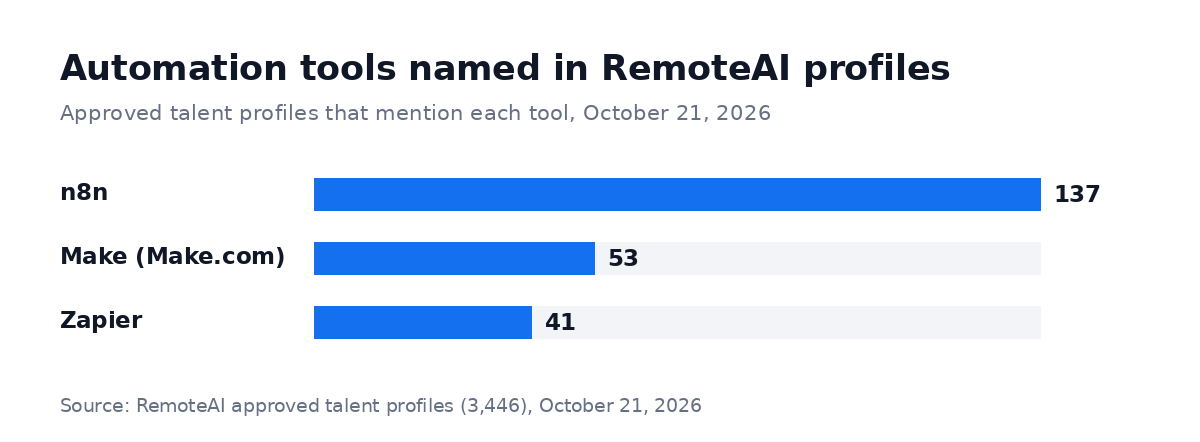 Approved RemoteAI talent profiles whose description names each tool, counted October 21, 2026. "Make" counts mentions of Make.com, Integromat or Make in a list of automation tools; one profile can name several tools.
137 profiles name n8n, 53 name Make and 41 name Zapier. Many specialists work across two or three of these tools. When you hire, ask which one they would choose for your workflow and why. A good answer names the trade-off, such as billing, hosting or who will maintain the scenario.
Mistakes to avoid
These are the problems that most often break a first Make.com automation:
- No error handling. A scenario that fails silently is worse than no automation. Set an alert for every failed run.
- Polling too often. Running every minute when every hour would do uses credits for nothing.
- Trusting AI output without checks. Send uncertain answers to a person instead of letting them through.
- One person's login. Connect apps with a shared business account, so the automation does not stop when someone leaves.
- No documentation. Ask for a short written map of each scenario: what triggers it, what it changes and who to call.
The short version
Make.com automation connects your apps in visual scenarios and bills by credits, with a free plan of 1,000 credits a month. Start with one workflow that saves time every week, such as lead routing or email triage. Build simple ones yourself, and hire a specialist when the workflow touches money, customers or AI decisions.
Need someone to build your first Make scenario? Browse n8n, Zapier and Make experts or all AI automation specialists, or post a job with your workflow in one sentence and ten real examples.
Sources: Make.com pricing page and FAQ (credits, free plan, AI provider note), read October 21, 2026. RemoteAI service templates (suggested starting prices), October 2026. RemoteAI figures: approved talent profiles counted October 21, 2026.