Most teams already have the data. What they lack is time: someone has to clean the export, write the formulas, join the tables, build the chart and explain what changed. That is exactly the work data analysis AI now speeds up, and also where it can quietly go wrong.
This guide explains what AI does well in data analysis, where it still fails, the best tools for each kind of work, how to keep company data safe, and when it is worth bringing in an analyst.
What AI does well in data analysis
Modern assistants do more than answer questions about a table. The good ones write and run code on your file, so the numbers come from a real calculation rather than a guess. That makes them strong at:
- Cleaning data. Fixing dates in five formats, splitting columns, removing duplicates, flagging empty or impossible values.
- Writing formulas and SQL. Describing what you want in plain words and getting the Excel formula, the pivot table or the query.
- First-pass exploration. Summaries, distributions, the top and bottom performers, obvious outliers.
- Charts. A first version of the chart you asked for, which you then adjust.
- Explaining. Turning a table into three plain sentences for a manager.
- Repeating the boring parts. The same weekly report, rebuilt from a new export in minutes.
Used this way, AI removes most of the mechanical work. The thinking — which question to ask, which number matters, what to do about it — stays with people.
Where data analysis AI still goes wrong
The risk is not that AI refuses to answer. It is that it answers confidently with a wrong number. Watch for:
- Silent calculation mistakes. A filter applied to the wrong column, a join that duplicated rows, an average of averages. The result looks plausible.
- Misread data. A column of IDs treated as numbers, a currency mixed with another, a header row counted as data.
- Invented explanations. "Sales dropped because of the holidays" when nothing in the data says why.
- Context it cannot know. A price change, a broken tracking tag, a one-off client. Only your team knows these.
- Large or messy files. Many tools limit file size, and quality drops on very wide or very dirty tables.
The fix is simple and non-negotiable: AI drafts, a person checks. Ask the tool to show the code or the steps it used, check two or three numbers by hand, and never send an AI figure to a client or a board without that check.
The best AI tools for data analysis
There is no single best AI for data analysis. The right tool depends on where your data already lives.
| Your situation | Best fit | Examples |
|---|---|---|
| A one-off file to explore or clean | A chat assistant that runs code | ChatGPT, Claude, Gemini, Julius AI |
| Data already in a spreadsheet | The assistant built into the spreadsheet | Copilot in Excel, Gemini in Google Sheets |
| Company dashboards | The AI features of your BI tool | Copilot in Power BI, Tableau's AI features |
| Recurring reports on a database | An analyst, a script or an agent with read-only access | SQL and Python, scheduled reports, an AI agent |
A few practical notes:
- Chat assistants are the fastest way to start: upload a file, ask a question, read the code they ran. Specialist tools like Julius AI are built around this, with charts and notebooks.
- Built-in assistants keep data where it already is, which is simpler for security and for sharing results.
- BI tools are where analysis becomes a habit: once a dashboard is built well, AI features can summarize it and answer questions on top of it. Our guide to Power BI dashboard examples shows four layouts worth copying.
- Agents suit recurring work: they connect to the source, run the queries on a schedule and send the summary. Our guide to the AI agent for business explains how to start one safely.
Features and plans change quickly, so check what each plan includes before you rely on it.
How to keep company data safe
Before anyone uploads a spreadsheet, agree on a few rules:
- Use a business or team plan whose terms say your data is not used to train models, rather than a personal free account.
- Remove personal data first. Names, emails, phone numbers and IDs rarely matter for the analysis; replace them with codes.
- Share the minimum. Export only the columns and rows the question needs.
- Keep the source of truth where it is. AI works on a copy; the official numbers stay in your database or BI tool.
- Log what was shared. A simple note of which file went to which tool, and why.
For documents rather than tables — invoices, forms, contracts — the same principles apply. Our guide to AI document processing covers validation and review in detail.
Who does this work: the skills behind AI-assisted analysis
AI-assisted analysis still runs on the classic analyst toolkit. Python and SQL do the heavy lifting, and BI tools turn the result into something a team uses every week:
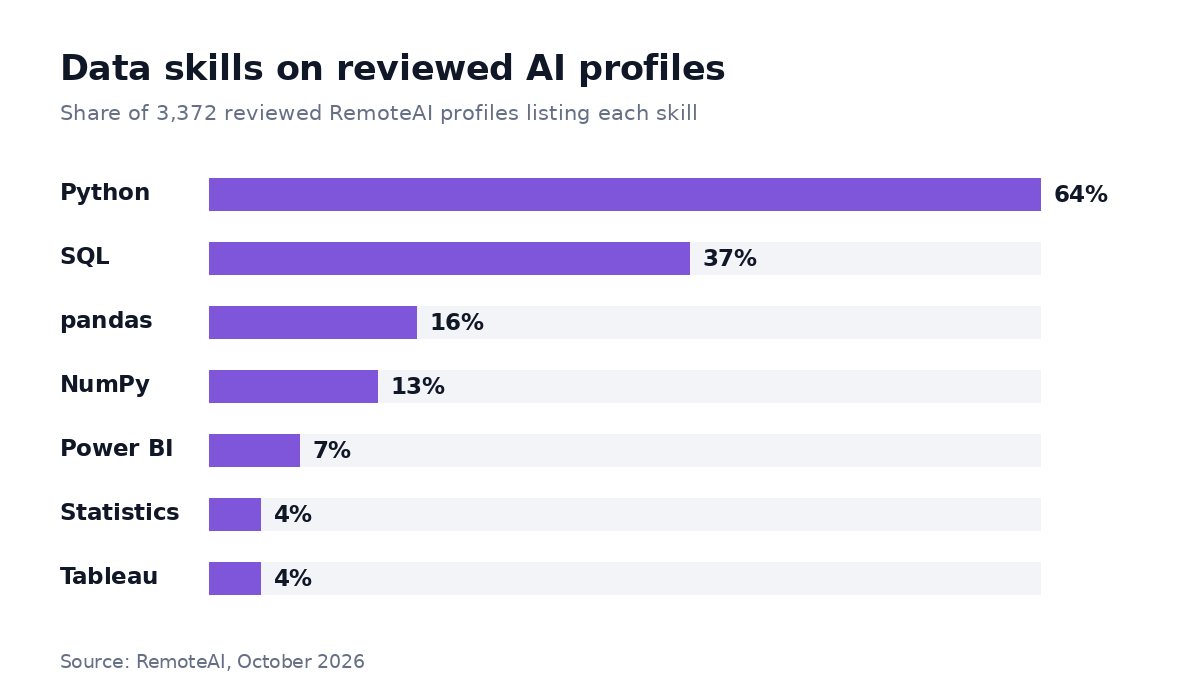
Share of 3,372 reviewed RemoteAI profiles listing each skill, October 2026. A profile can list several skills.
The pattern matters when you hire. Python and SQL are common; people who can also design a clear dashboard in Power BI or Tableau are much rarer. If your goal is a report the team actually opens, look for both.
When to bring in an analyst
Use AI on your own when the question is one-off, the data is small and a rough answer is enough. Bring in an analyst when:
- the numbers will drive a decision about money, people or customers;
- the data comes from several systems that need to be joined and reconciled;
- the same report is needed every week and should refresh on its own;
- nobody on the team can check whether the AI's result is right.
As a guide, these are the starting points RemoteAI suggests to specialists for fixed-price data and dashboard projects:
| Scope | Typical content | Suggested starting price |
|---|---|---|
| Essential | 1 data source, up to 5 charts, video hand-over | from about $150 |
| Standard | Up to 3 data sources, data cleaning and model, automatic refresh | from about $400 |
| Premium | Up to 6 data sources, filters and views per team, 2 weeks of support | from about $900 |
When you hire, ask to see a past dashboard, how they checked the numbers, and how they would use AI to go faster without trusting it blindly. The interview questions in our guide on how to hire an AI engineer work well for data roles too, and our data scientist salary guide helps you set a realistic budget for a full-time role.
How to start this week
- Pick one recurring question your team answers by hand — weekly sales by region, support tickets by topic, campaign results.
- Export a clean sample without personal data.
- Ask an AI tool to reproduce last week's answer, and compare it with the number you already trust.
- If it matches, automate the boring steps; if it does not, find out why before going further.
- Turn it into a dashboard once the question and the numbers are stable.
You can browse data science and analytics experts on RemoteAI, see AI automation specialists for recurring reports, or describe your project and get matched with people who have built similar analysis.
Sources: RemoteAI reviewed talent profiles and suggested service prices, October 2026. Tool examples reflect publicly announced features as of October 2026; check each vendor's current plans.